Candy Dialogue Creator
User-first dialogue writing and translation GUI, with project integration.
The free companion application to Candy Dialogue Engine makes writing dialogue scripts and translating them a breeze, and cleanly separates coding your project vs. writing dialogues. It also provides great features for teams, where separating and merging work is part of the pipeline.
Most impressively: since dialogues can modify any variables, call functions or emit signals, and can be loaded from exported .txt files at runtime, the Candy Dialogue Creator is effectively a ready-made, easy-to-use modding tool that will work out-of-the-box with any game made in Godot! It can even be integrated inside your game, if you’d like to provide access to players this way.
Intuitive Workspace
Candy Dialogue Creator offers a clear and intuitive UI to make dialogue creation very efficient:
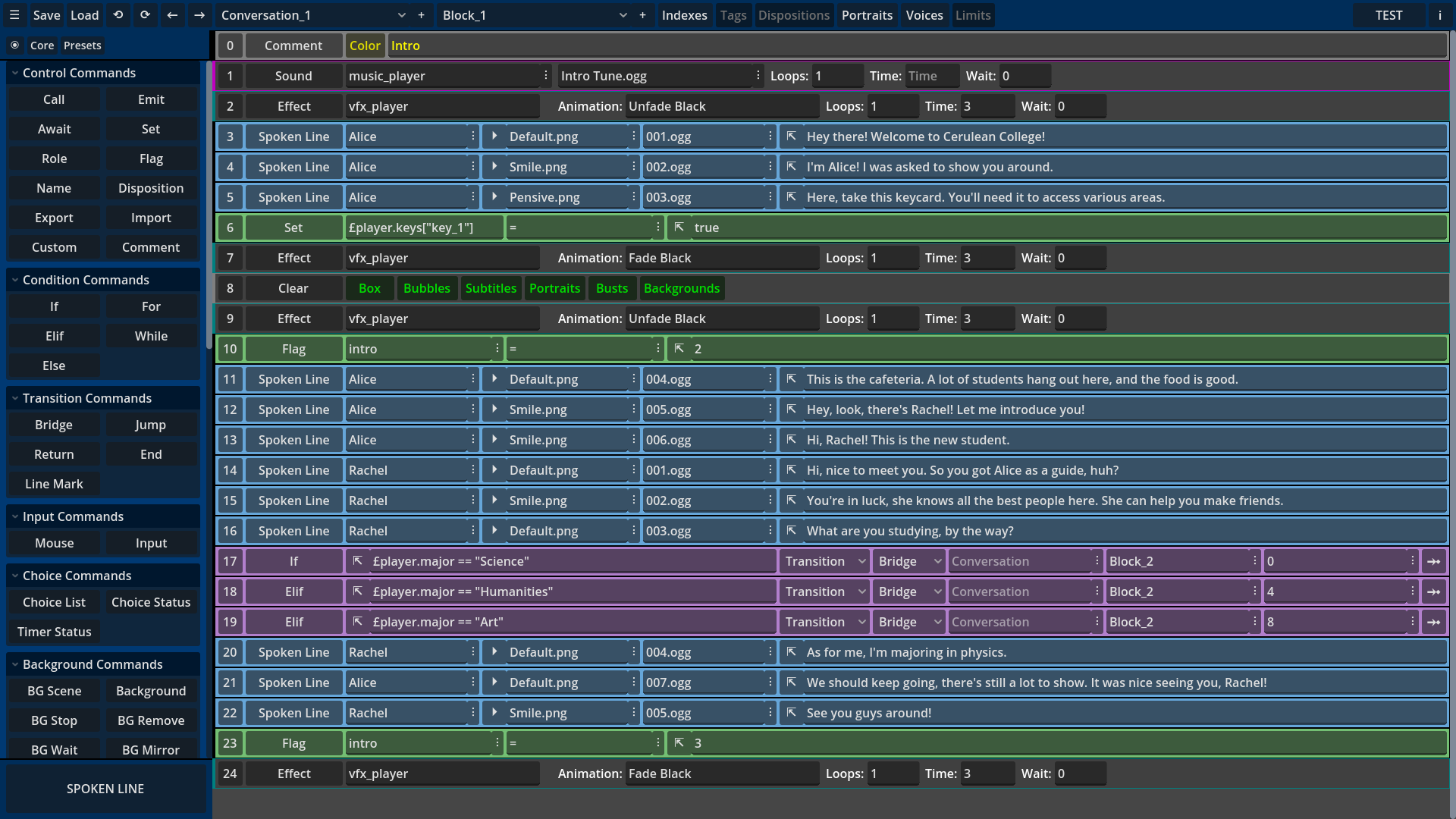
Navigate conversations and blocks easily, display dialogue lines as a color-coded list, edit line data on the fly, and hide unused line data fields to avoid clutter. Add lines anywhere with a single click, including before/after multiple selected lines.
And don’t waste time adding the same lines over and over: create line presets to instantly add single lines or groups of lines, complete with pre-written data.
Minimal Typing
Anyone who has written dialogues knows that typing is the most time-consuming task, so save time by selecting line data from drop-down menus!
Candy Dialogue Creator can scan your Godot project files to find and list relevant media and scenes, and you can save dispositions and speaker references you’d like quick access to. If you don’t have access to the actual project, this will work with a mock project folder that includes only the relevant resource files.

And if that’s not enough, thanks to Candy Dialogue Engine’s smart folder structure, media files are listed separately for each media player. So browse comfortably through the list of ambient sounds without being cluttered by musics or sound effects!
Media Preview
Unsure which portrait best fits a line? Can’t remember the name of a voice file? Looking for a specific sound effect? No problem! Hover any image, audio or video file to see or listen to it instantly!
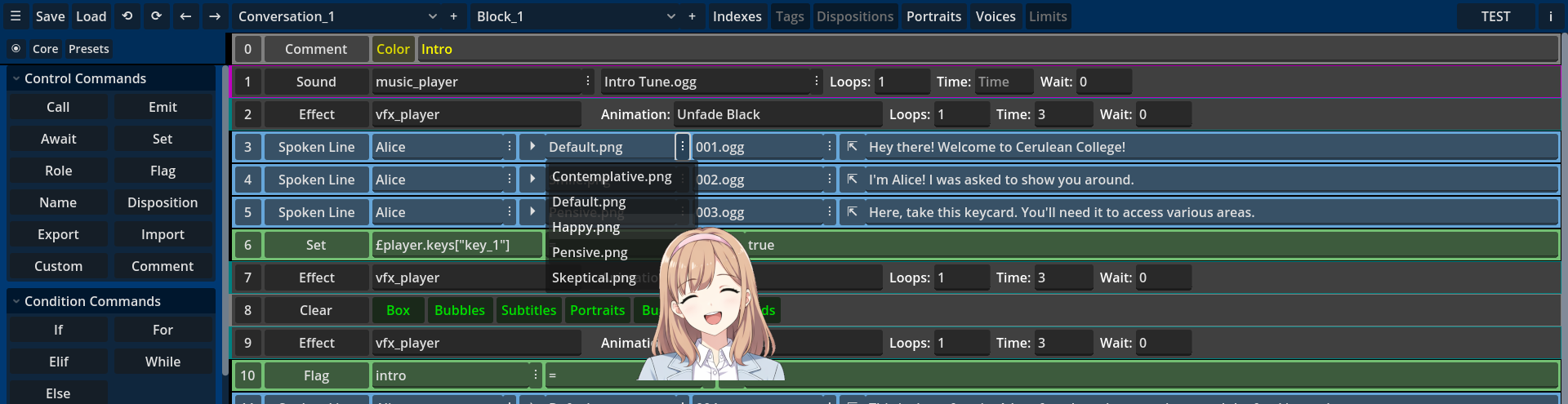
Not only that, but you can set custom preview sizes for various image files: display background previews larger than portraits, and size all images precisely for your own comfort!
Writer UI
Write dialogue lines even more conveniently thanks to the built-in Writer UI, which is essentially an editor of its own, designed with all the needs of writers in mind!
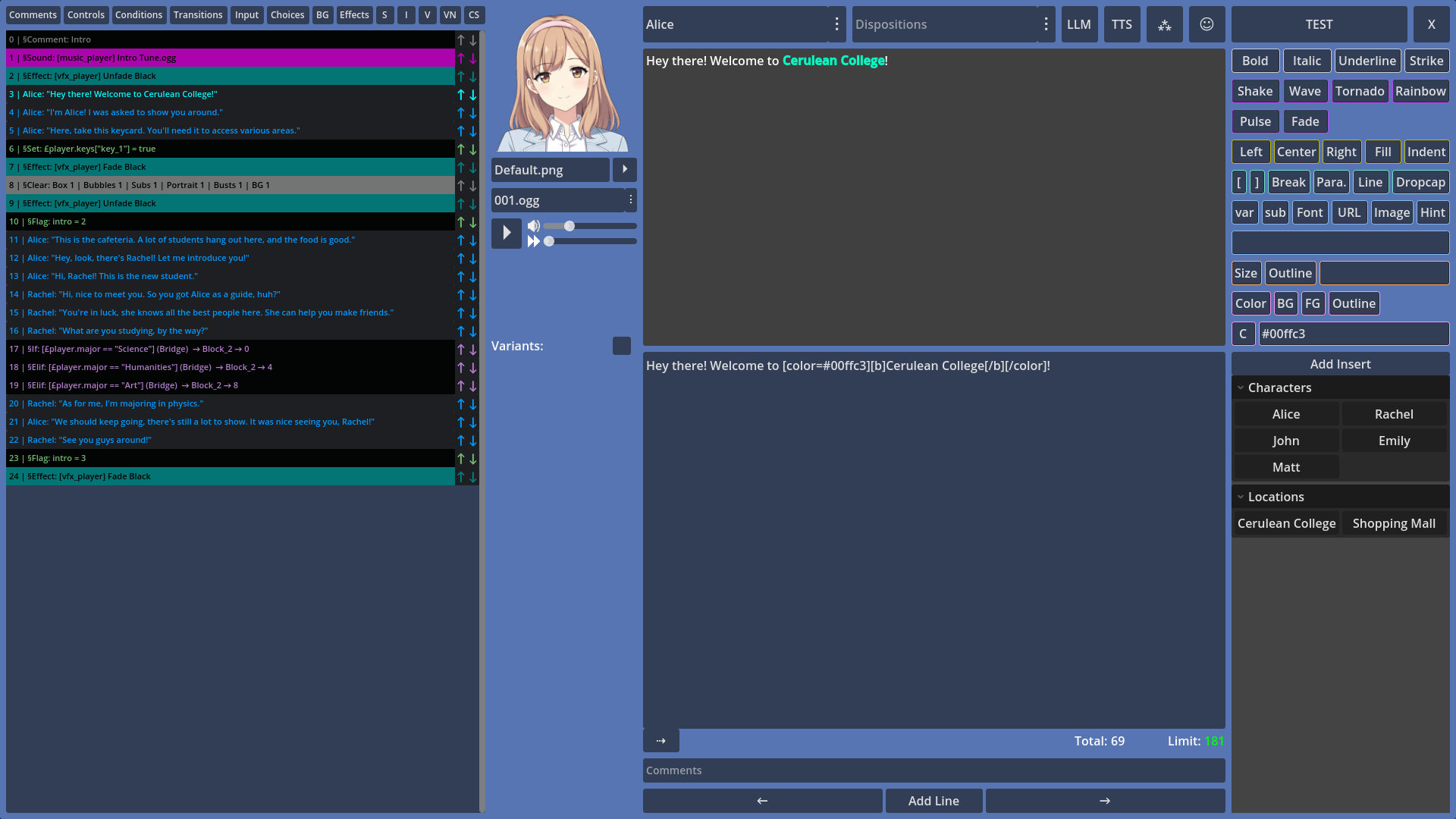
The Writer UI provides large areas for writing spoken text, character counts with limit display and warning, permanent portrait display, voice preview with volume and progression controls, buttons to quickly insert BBCode tags, and even lets you create custom one-click text inserts to add words, symbols or other things you frequently type!
The Writer UI also displays a convenient overview list of all lines in the Block you’re working on, with options to hide command lines by category, providing crucial contextual awareness and quick navigation as you write dialogues. Buttons and keyboard shortcuts also let you easily add or re-order lines, without exiting the Writer UI.
And if you work with other people on the same dialogues, or if you just want to leave notes to yourself, the Writer UI can save and display comments for each line.
Translator Tools
The Writer UI has great features for translators too, by letting you edit spoken line variants underneath the default text, in an adjustable and ergonomic vertical layout.
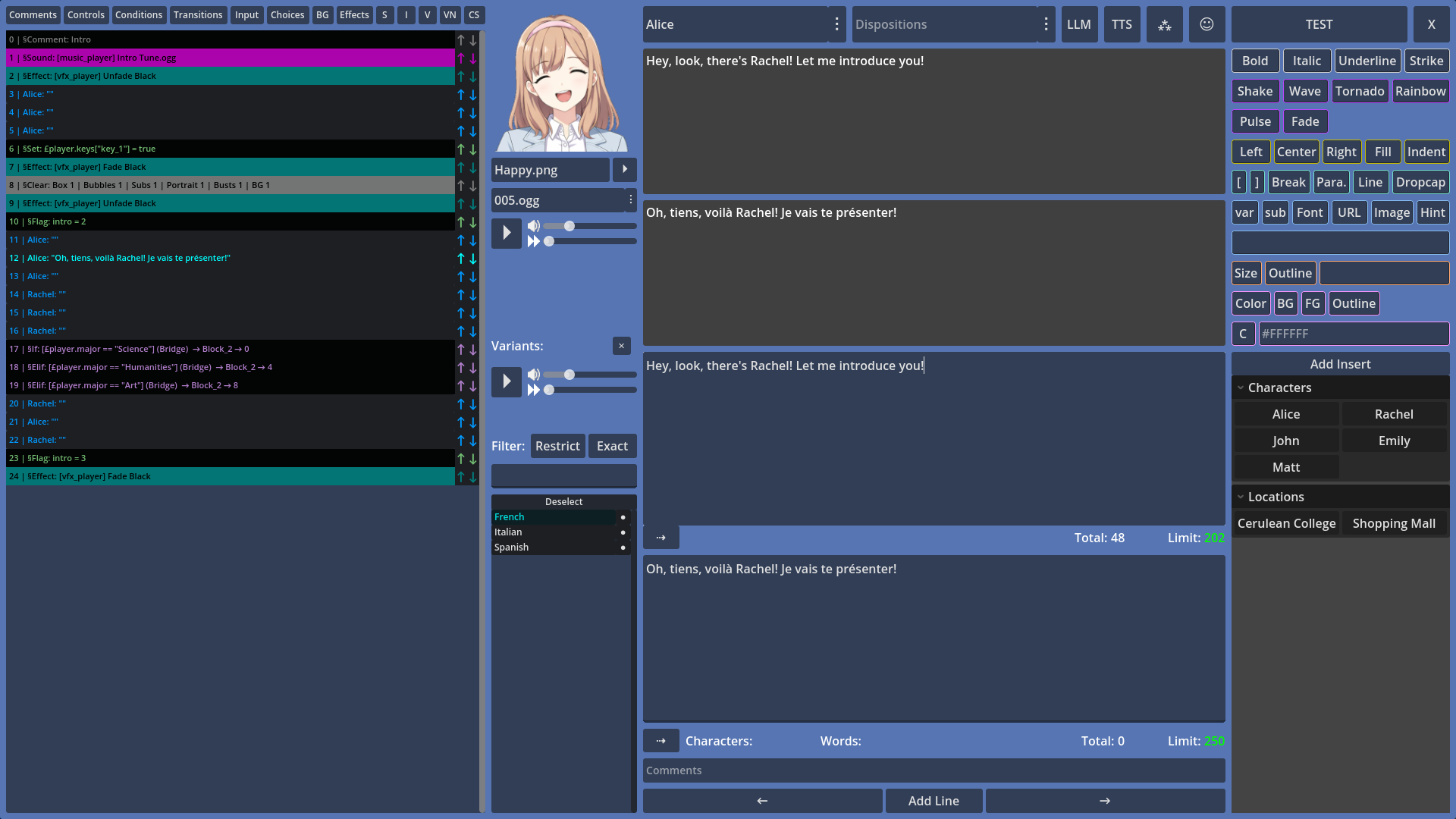
Always display the speaker’s portrait for better tone and mood immersion, switch active line variants with one-click and use filters to narrow down the variant list to only those you work with, add variants to lines in one click or configure variants to be automatically added to new lines, and let the line overview display the text of any selected variant so you can quickly see which lines still need translating!
And last but not least: not only do you not need to manually assign voice files to variants (this is handled automatically), but the Writer UI even lets you preview voice files for variants, so your writing can always be a perfect match!
Choice UI
With how advanced Candy Dialogue Engine’s choice system is, it only makes sense to include dedicated tools to configure choices in Candy Dialogue Creator.
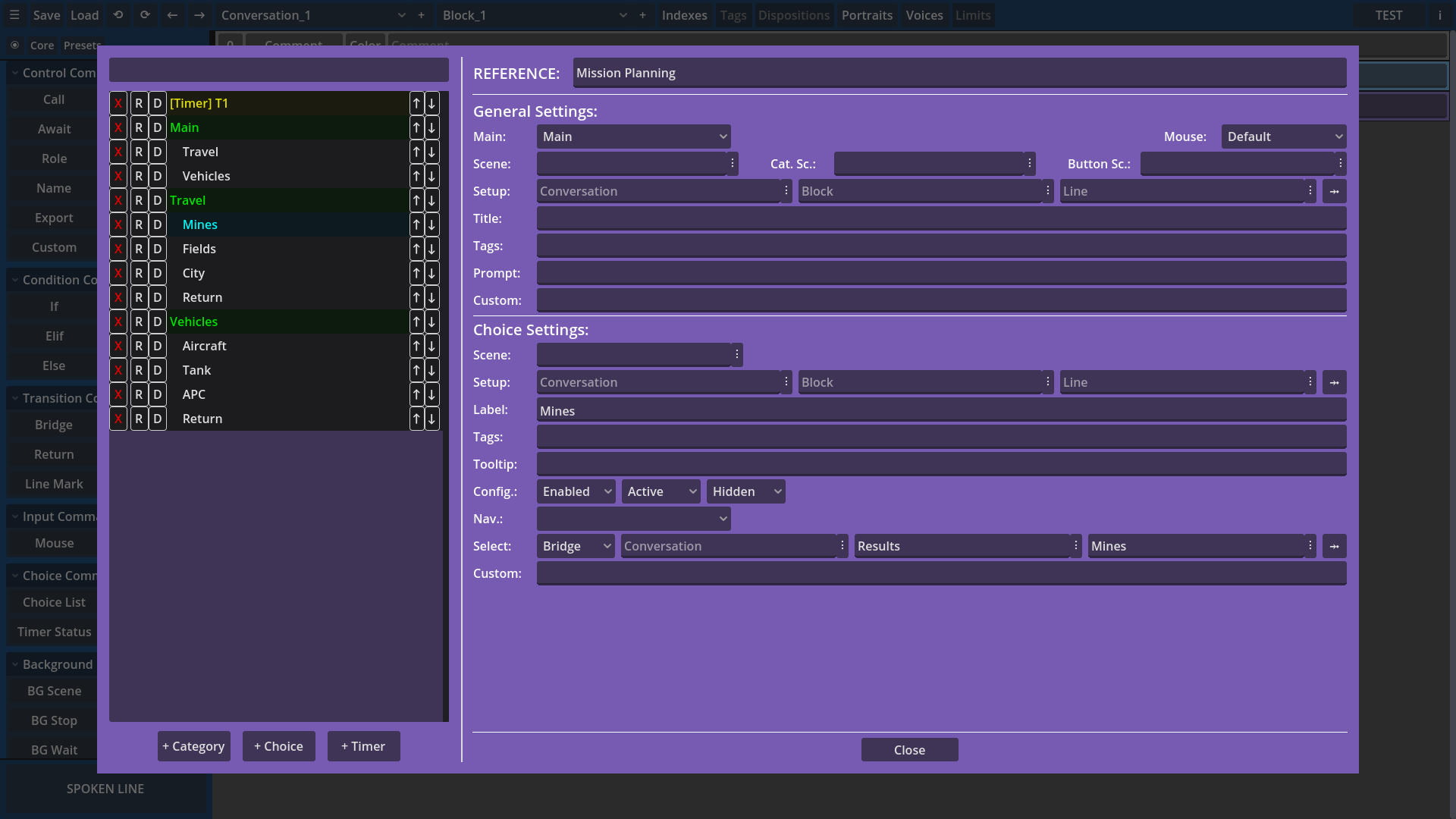
Configure or modify choices in detail through a convenient UI, with just a few clicks: add choices, configure their effects, reorder them, assign them to categories, setup timers, select the scenes to use at runtime to display the choice menu, categories or buttons… all in just seconds or minutes!
Comment Lines
Annotating your work is essential for readability. Thankfully, we have you covered: add comment lines to display custom, colored text in the Candy Dialogue Creator UI, for any purpose you might need.

Comments are exported with dialogues to prevent being lost, but don’t interfere with the dialogues at runtime in any way.
Two-Click Testing
Anytime you want to test your dialogue, just click the ‘Test’ button in the UI to instantly export your dialogue to a test .txt file in your project folders.
Back in Godot, open the Candy DE Test Scene, and optionally set the Conversation, Block and Line to start at in the Inspector. Run the scene, and done!
User/Project Profiles
Setup Candy Dialogue Creator profiles for every project you have, and for every user if you work on a shared device.
Profiles store project paths and settings, user preferences, and custom presets and text inserts, allowing you to have a dedicated work environment for each project you work on, without conflicts with other users.
Neat and practical.
Source Code
Full access to the source code is provided, letting you customize the Candy Dialogue Creator any way you want. Change the UI appearance, create your own keyboard shortcuts, add support for custom commands from Candy Dialogue Engine, or implement entirely new features.
Shape the Experience
Candy Dialogue Engine is still in its first iteration, and while we have several ideas for its future, we want to strongly consider user feedback to decide how to develop it further.
Adopting it now gives you the chance to guide its growth: whether it’s about features, layout, or just the graphical style — share your needs and suggestions with us so it can become the ideal tool for you.
We’re open to significant redesigns at this stage — which will be less likely as more work is put into it — so now is the best time to join in!
Licensing
Candy Dialogue Creator is published under the MIT License. It’s free to use, modify and re-distribute as you please! So feel free to create your own fork, or even adapt it to work with other tools besides Candy Dialogue Engine!
Compatibility
Candy Dialogue Creator is provided as a compiled executable, and as a raw Godot project.
Godot:
The raw project form is compatible with Godot Engine 4.5 and above. It will always be updated to maintain compatibility with newer Godot subversions.
Operating System:
Raw — Dependent on Godot: hardware and operating systems that can run Godot can run Candy Dialogue Creator.
Compiled — Linux, Windows, Mac (unsigned)
Hardware:
A screen resolution of at least 1920×1080 is recommended.
Candy Dialogue Creator should work fine on older/low-end hardware.
Note: screenshots on this page are provided for illustrative purposes. As such, they may include ai-generated art assets, such as characters and backgrounds, overlaid with UI elements using Candy Dialogue Engine’s capabilities. Depicted art assets are not included with Candy Dialogue Engine.