Candy Dialogue Creator
User-first dialogue writing and translation GUI, with project integration.
The free companion application to Candy Dialogue Engine makes writing dialogue scripts and translating them a breeze, and cleanly separates coding your project vs. writing dialogues. It also provides great features for teams, where separating and merging work is part of the pipeline.
Most impressively: since dialogues can modify any variables, call functions or emit signals, and can be loaded from exported .txt files at runtime, the Candy Dialogue Creator is effectively a ready-made, easy-to-use modding and programming tool that will work out-of-the-box with any game that features Candy DE!
Intuitive Workspace
Candy Dialogue Creator offers a clear and intuitive UI to make dialogue creation very efficient:
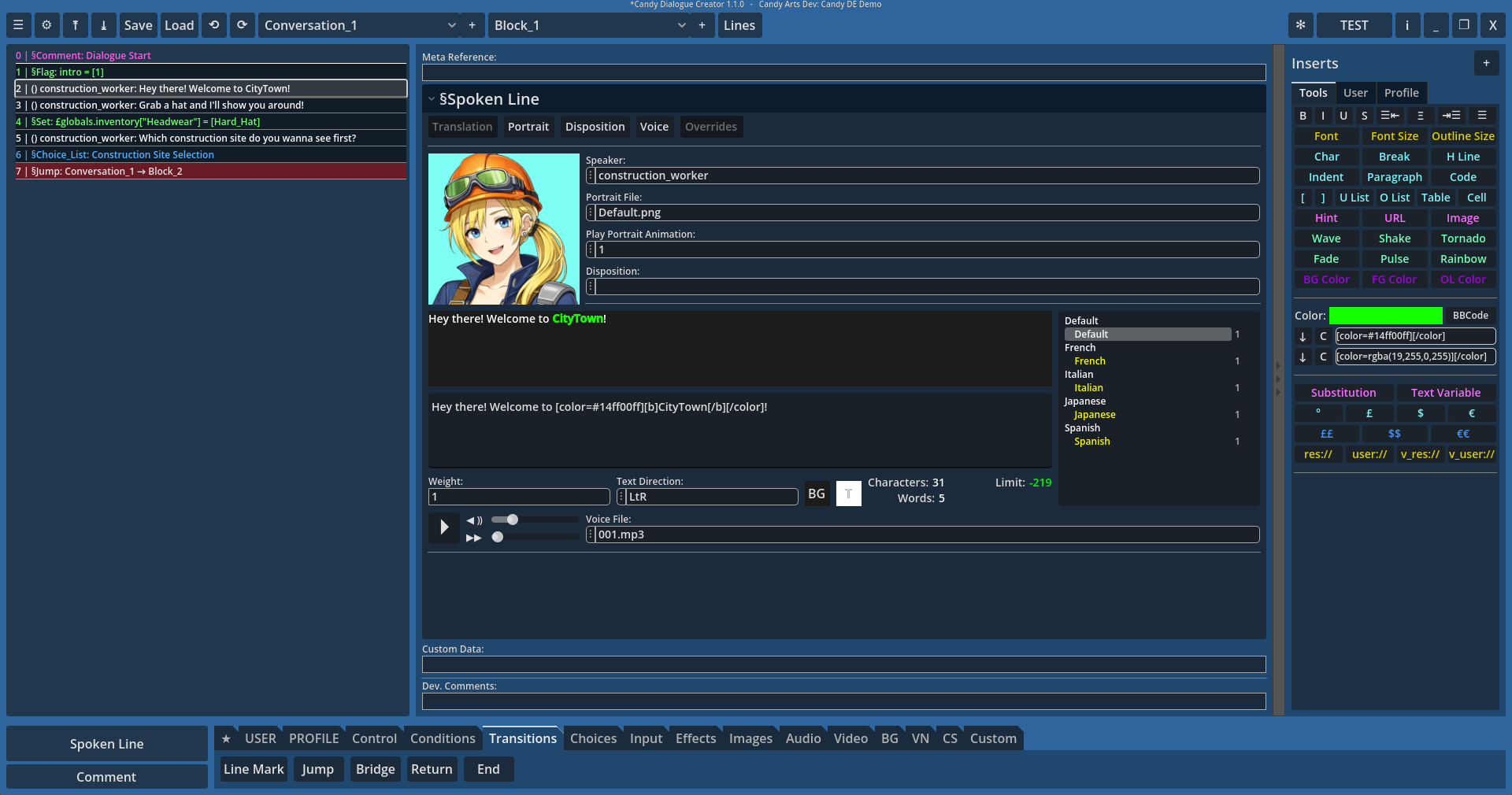
Navigate conversations and blocks easily, display dialogue lines as a color-coded list, edit line data on the fly, and hide unused line data fields to avoid clutter. Add lines anywhere with a single click, including before/after multiple selected lines.
And don’t waste time adding the same lines over and over: create line presets to instantly add single lines or groups of lines, complete with pre-written data.
Minimal Typing
Candy Dialogue Creator can scan your Godot project files to find and list relevant media and scenes, and you can save dispositions and speaker references you’d like quick access to. If you don’t have access to the actual project, this will work with a mock project folder that includes only the relevant resource files.
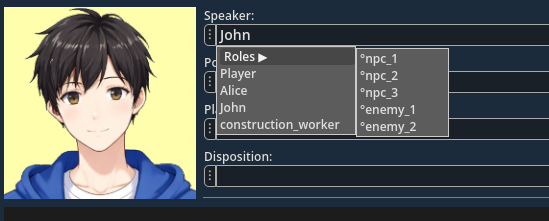
And if that’s not enough, thanks to Candy Dialogue Engine’s smart folder structure, media files are listed separately for each media player. So browse comfortably through the list of ambient sounds without being cluttered by musics or sound effects!
Media Preview
Unsure which portrait best fits a line? Can’t remember the name of a voice file? Looking for a specific sound effect? No problem! Hover any image, audio or video file to see or listen to it instantly!
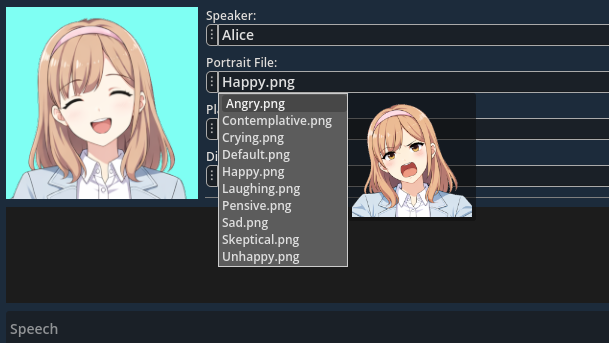
Not only that, but you can set custom preview sizes for various image files: display background previews larger than portraits, and size all images precisely for your own comfort!
Translator Tools
The Writer UI has great features for translators too, by letting you edit spoken line variants while reading another language’s text, in an ergonomic vertical layout.
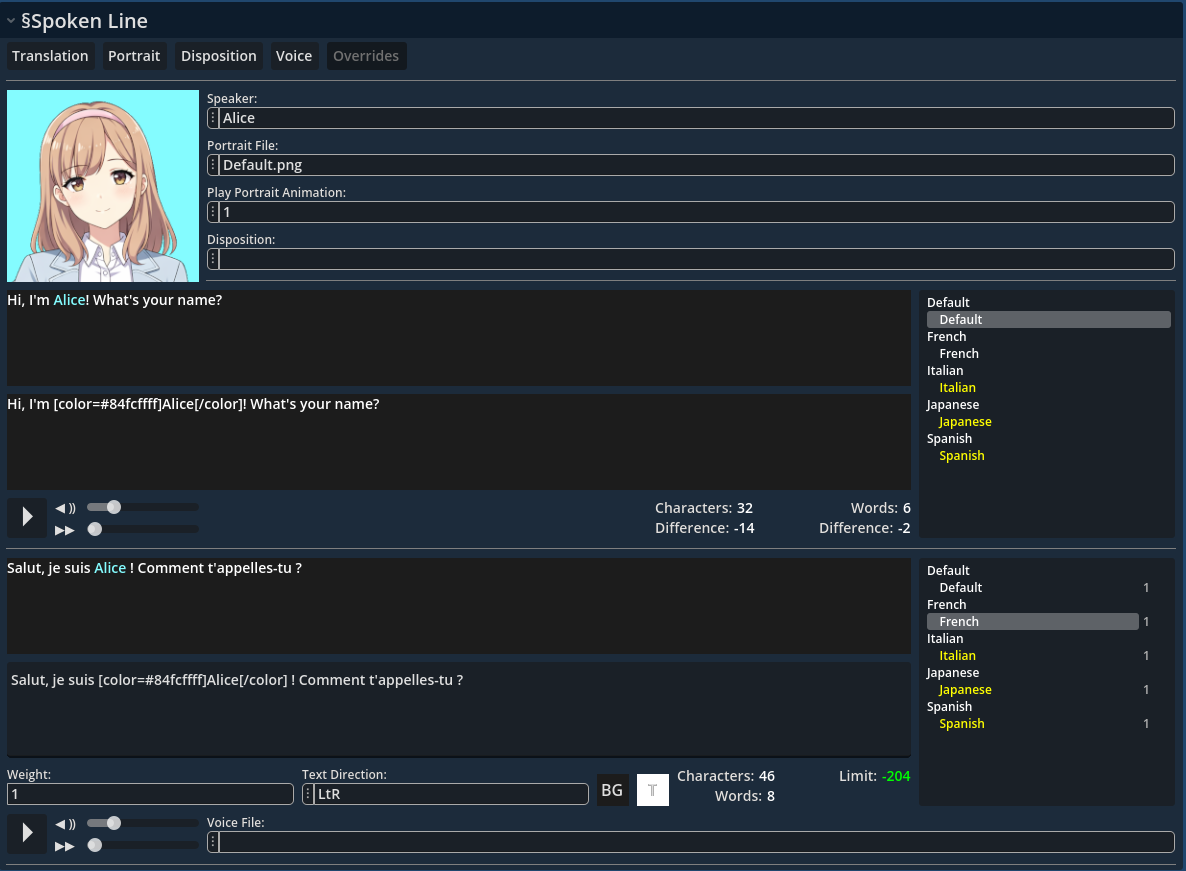
Always display the speaker’s portrait for better tone and mood immersion, and switch text variants with one-click.
Languages and variants can easily be added through the settings menu, and Candy Dialogue Creator takes care of combining them. You can then filter out the ones you never use in your dialogues in just one click.
And last but not least: not only do you not need to manually assign voice files to variants (this is handled automatically), but the Writer UI even lets you preview voice files for other languages and variants, so your writing can always be a perfect match to the recorded speech!
Comment Lines
Annotating your work is essential for readability. Thankfully, we have you covered: add comment lines to display custom, colored text in the Candy Dialogue Creator UI, for any purpose you might need.
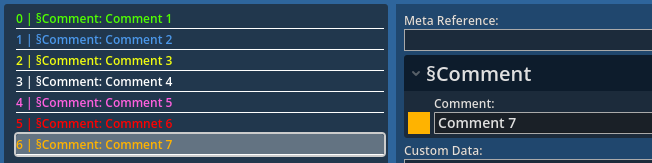
Comments are exported with dialogues to prevent being lost, but don’t interfere with the dialogues at runtime in any way.
Two-Click Testing
Anytime you want to test your dialogue, just click the ‘Test’ button in the UI to instantly export your dialogue to a test .txt file in your project folders.
Back in Godot, open the Candy DE Test Scene, and optionally set the Conversation, Block and Line to start at in the Inspector. Run the scene, and done!
User/Project Profiles
Setup Candy Dialogue Creator profiles for every project you have, and for every user if you work on a shared device.
Profiles store project paths and settings, user preferences, and custom presets and text inserts, allowing you to have a dedicated work environment for each project you work on, without conflicts with other users.
Neat and practical.
Source Code
Full access to the source code is provided, letting you customize the Candy Dialogue Creator any way you want. Change the UI appearance, create your own keyboard shortcuts, add support for custom commands from Candy Dialogue Engine, or implement entirely new features.
Licensing
Candy Dialogue Creator is published under the MIT License. It’s free to use, modify and re-distribute as you please! So feel free to create your own fork, or even adapt it to work with other tools besides Candy Dialogue Engine!
Compatibility
Candy Dialogue Creator is provided in two forms:
• Compiled Executable — Recommended use for dialogue creation and editing.
• Raw Godot Project — For forking or customizing the project, integrating the Candy Dialogue Creator to projects, or inspecting the code.
Godot:
Compiled — The compiled form is standalone: Godot compatibility doesn’t apply.
Raw — The raw project is compatible with Godot Engine 4.5 and above. It will always be updated to maintain compatibility with newer Godot subversions.
Operating System:
Compiled — Linux, Windows, MacOS (unsigned)
Raw — Dependent on Godot: operating systems that can run Godot can open Candy Dialogue Creator.
Hardware:
A screen resolution of at least 1920×1080 is recommended.
Touchscreens may not be fully compatible at this time.
Candy Dialogue Creator should work fine on older/low-end hardware.