
Candy Dialogue Engine was first published in March 2026 and is in pre-release until July 2026.
Candy Dialogue Engine is feature-complete, but some edge-case bugs may exist.
Full testing isn’t feasible without implementing it in dozens of different projects, so we rely on our early users to report any issues they encounter.
As thanks for your help and understanding, we are offering significant discounts on our Indie-tier licenses until the end of the pre-release phase.
Candy Dialogue Engine
All-In-One Dialogue System, Visual Novel Engine, Media Synchronizer, Cutscene Orchestrator, Narrative Manager, Mod Support Solution.
Standing at the endgame of dialogue managers, Candy Dialogue Engine was designed to achieve five core goals:
- Make dialogues fast and simple to write.
- Adapt to any game type or genre.
- Provide or support any features developers may need.
- Make dialogue synchronization with game events easy.
- Allow full code and UI customization.
To that end, it combines all the tools you’ll need for speech and narrative crafting:
- Full dialogue system with various modes and features: dialogue boxes with portraits, subtitles, speech bubbles, voiced dialogues, speaker roles, custom text styling, Lexicon, word substitution, typewriter effect, etc.
- Visual Novel built-in tools: display and animate character busts and background layers, in perfect timing with the dialogue.
- Translation/Localization made easy: assign each spoken line any number of variants you want, let the engine automatically assign voice files to variants, or use the word substitution feature to easily swap gendered words.
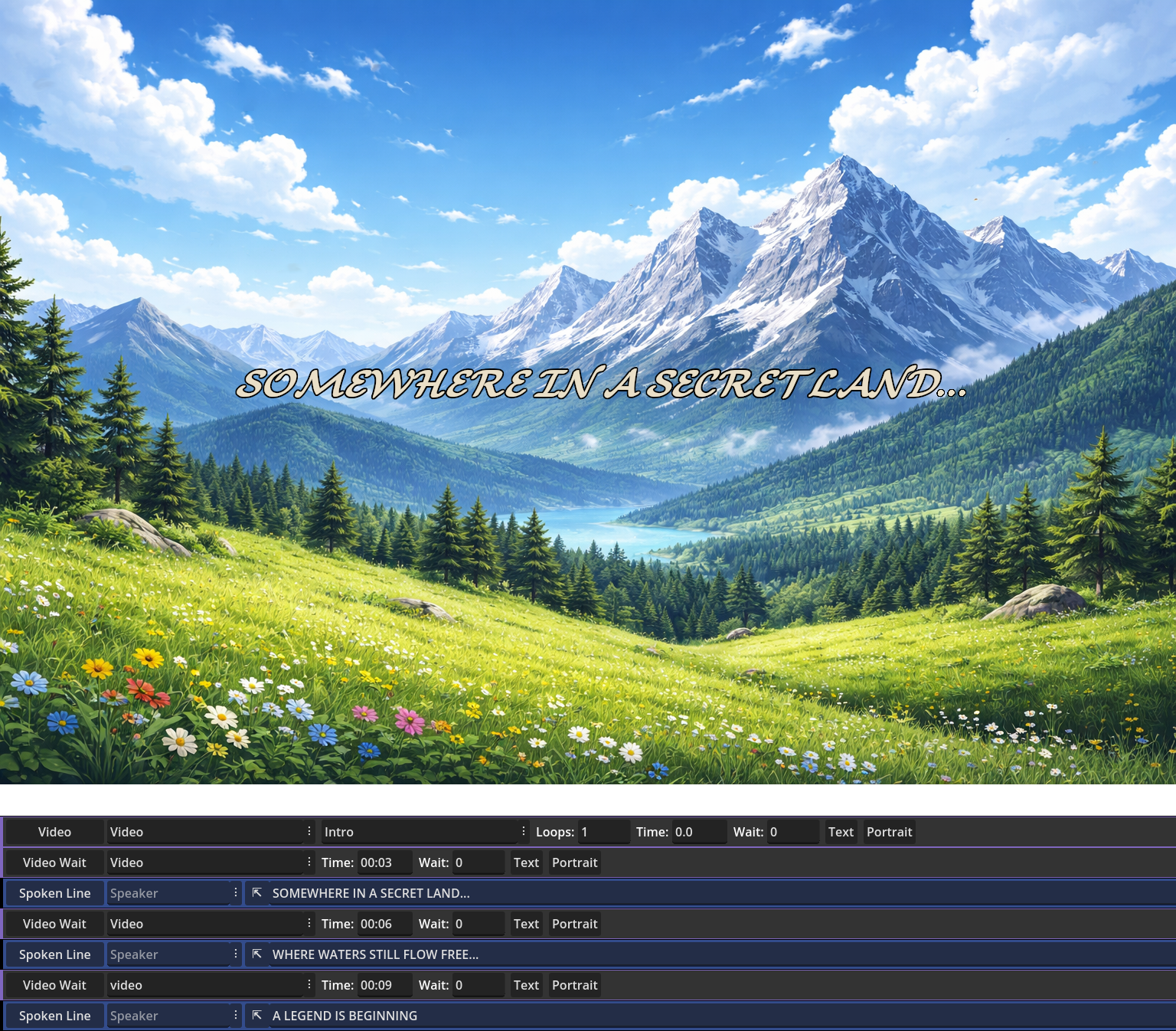
- Media sync: synchronize media such as videos, music, sounds, images and visual effects very precisely with dialogues. Start, pause and stop at specific lines, or suspend dialogue until specific media timestamps or frames.
- Complete variable control and usage: modify any variable in your game through dialogues, and display variables in text. Every piece of data can be substituted with a variable reference, for full adaptability at runtime. Condition checks are possible too, featuring ‘if/elif/else’ checks but also ‘for‘ and ‘while‘ loops.
- Game state control: script live cutscenes or control any part of your game through dialogues thanks to built-in commands: change the active camera, move and rotate nodes with markers, animate objects and characters, change lights, set nodes in motion, and more.
- Fully customizable dialogue UI: create the UI elements you want, from aesthetic design to position on-screen, and personalize even the node structure, with no limitations and no complicated code editing. Program custom UI behaviors, with the help of hook functions called by the dialogue engine.
- Companion GUI: the standalone Candy Dialogue Creator allows creating dialogues without writing any syntax, and provides plenty of quality-of-life features to make dialogue editing a breeze. Let it read from your project folder to display drop-down lists of media files, character names, and so on, for quick data entry. Preview portraits, voice files and other media just by hovering them with the mouse. Or insert custom words, strings, or groups of dialogue lines with pre-filled data in just one click.
- Advanced technical capabilities: live edit dialogues as they run, run multiple dialogue instances simultaneously, use match statements or hook functions to easily add custom features, and get full access to the engine code.
- Game modding: the sheer power of Candy Dialogue Engine, combined with the fact that dialogues can be read from external .txt files at runtime, means that you can design your game to run player-made dialogues that modify game state or script and trigger game events. This effectively grants your players nearly unlimited modding power.
Overall, Candy Dialogue Engine is made for beginners and experts, hobbyists and professionals alike: incredibly simple for simple projects, advanced features available for advanced needs, unlimited potential as to never hold you back, and intelligently crafted to maximize productivity and efficiency. The companion Candy Dialogue Creator GUI even makes it ideal for teams, with various features to help separate tasks, compartmentalize access to project files and merge work.
And this just scratches the surface! For more details, see the feature overview below, and download it for free to give it a try.
Ease Of Use
Let’s get this out of the way first: despite how advanced Candy Dialogue Engine is, it remains incredibly simple to use.
Installation? Drop it in your project folder → Add two autoloads and one input method → Done. It’s now ready to use with default presets.
Dialogue writing? Click to add lines → Input relevant data. Minimal typing, convenient data lists, no special formatting, and much more for a fast workflow.
Testing dialogues? Click « Test » → Alt+Tab to Godot → Run.
Final export? Open the Export menu → Click « Export » → Enter a file name → « Confirm ».
Coding? None to hardly any*. Any coding would be limited to personalizing a few hook functions to better integrate some features with your own game logic, adding custom behavior to UI elements, or creating your own self-made features. As an example, if you can implement game state tracking in your project, then editing the function that modifies game state when dialogue starts or ends is trivial.
*Writing conditions and assigning variables not included — let’s be serious, that’s just glorified algebra.
Scaling Complexity
What makes Candy Dialogue Engine a great choice for any game and for developers of any experience level, is the fact that it never gets more complicated than your own project.
• For basic needs, Candy Dialogue Engine is as simple as can be and essentially holds your hand: all the standard dialogue features are straightforward, working as you’d usually expect, and default UI elements are provided so you can use the engine straight out-of-the-box.
• For more advanced features, learn-as-you-go: focus only on the features you use and ignore the rest. When you start configuring things to your needs, Candy Dialogue Engine guides you without restraining you beyond reason.
• And if you want to do serious customizing, you have complete freedom: add logic to UI elements beyond their standard functioning, design complex hook functions, or go straight to adding or modifying code in the engine itself.
Documentation is provided for every feature and option, and the engine logic is a fine-tuned machine. If something ever feels hard, it’s probably because you’re trying to do something hard.
Simple Structure
Dialogue scripts are split into a straightforward hierarchy: Dialogues → Conversations → Blocks → Lines.
The engine iterates through Lines in order, performing what they’re designed and configured to do, and transitioning between Blocks and Conversations as instructed.
Want to modify variables, call functions or emit signals? Just insert the corresponding Command Lines between Spoken Lines! Candy Dialogue Engine gives you complete game state control from within dialogues with just a few commands!
No programming required, and no syntax to memorize: just create Conversations and Blocks, add Lines, and fill their data fields as needed.
Your Style
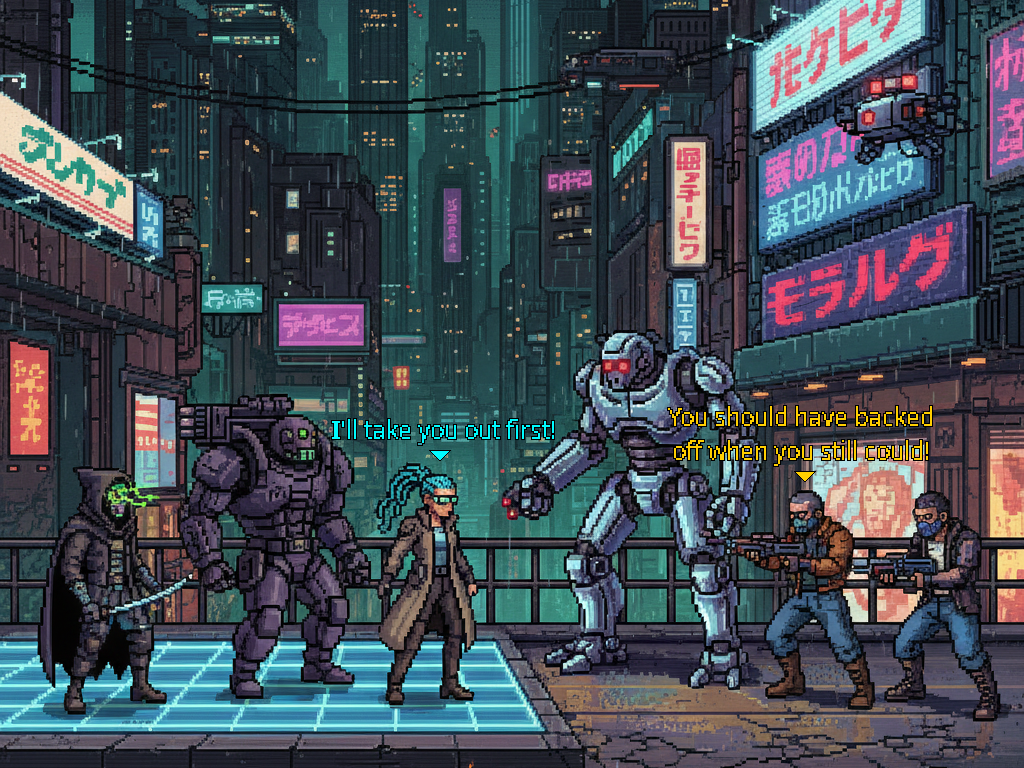
Whether you want an RPG dialogue box with portraits, visual novel busts, a chat box format, comic book speech bubbles, subtitles, voice only, or maybe your very own custom style: display dialogues any way you like!
Portraits are versatile too: display the standard static images, or use animated portraits with Sprite2D/3D or AnimatedSprite2D/3D nodes. Or playback video portraits, with a VideoStreamPlayer node!
And nothing is stopping you from displaying a live close-up of an animated character in the portrait box if you’re crafty.
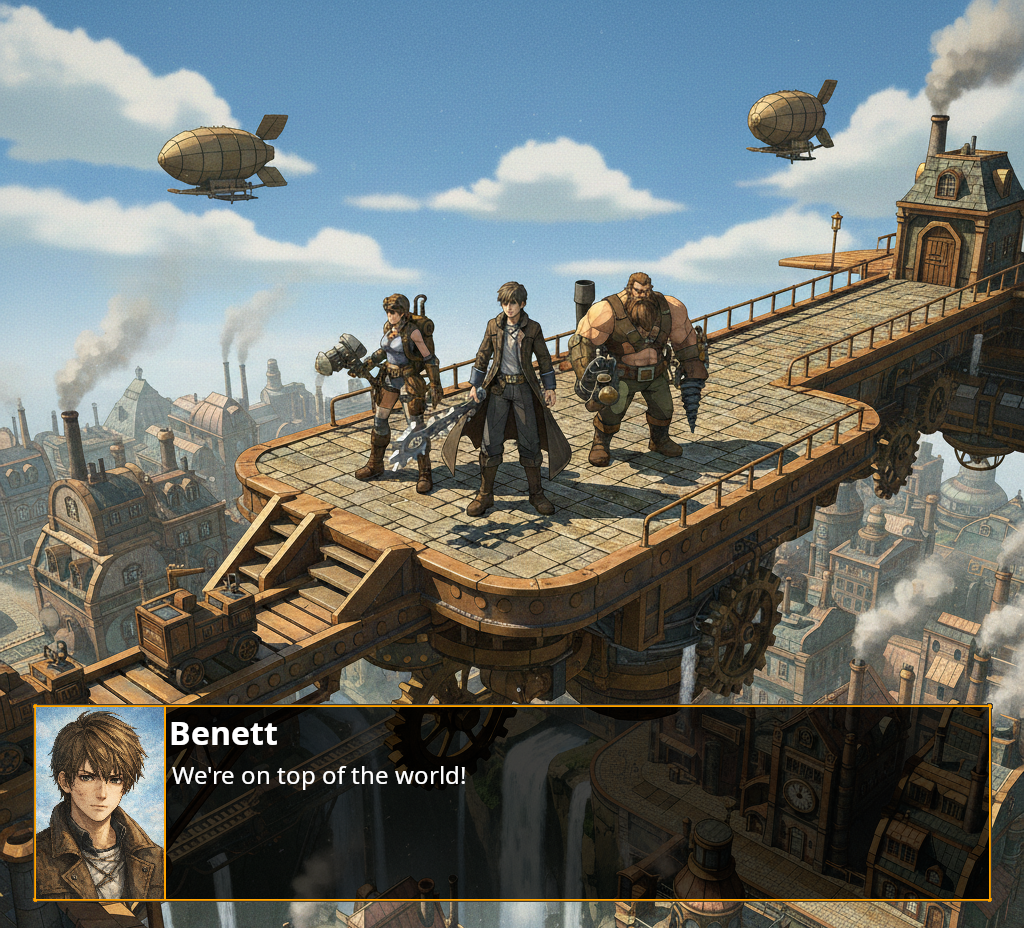
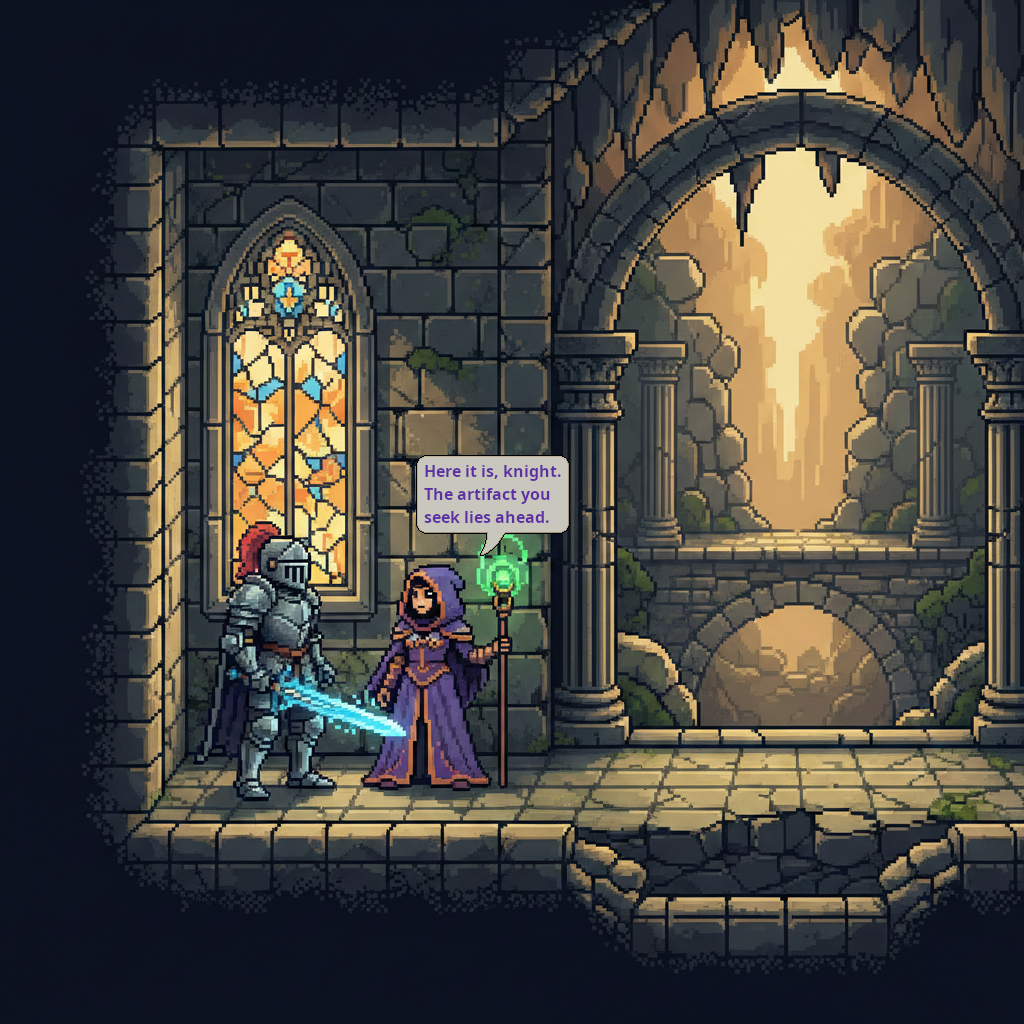
How about a hybrid VN mode, with busts for NPCs and portraits for the player, for a more immersive feel? That’s included!
Does Candy Dialogue Engine feature a progressive writing (typewriter) effect? You bet, with optional ‘press key to instant display’ and ‘hold key to speed up/down’!
Custom text colors for different characters? Yes, and other custom BBCode formatting too!
Automatic progression? Of course, with customizable timer or synced to voice playback! We don’t do things halfway around here.
Your UI
When we say ‘customizable UI’, we mean it: whether it’s the dialogue box, speech bubbles, background displays or anything else — every UI element can be designed your way, from position on screen, to size, to themes and styles, and even to the node structure itself!
The process is incredibly simple:
1. Select a root node.
2. Attach the appropriate UI script among those provided.
3. Add the one or two child nodes that Candy Dialogue Engine requires.
4. Add their paths to the pointer variables in the script.
Done. Feel free to add any additional nodes you want for any purpose, and use the node hierarchy you like.
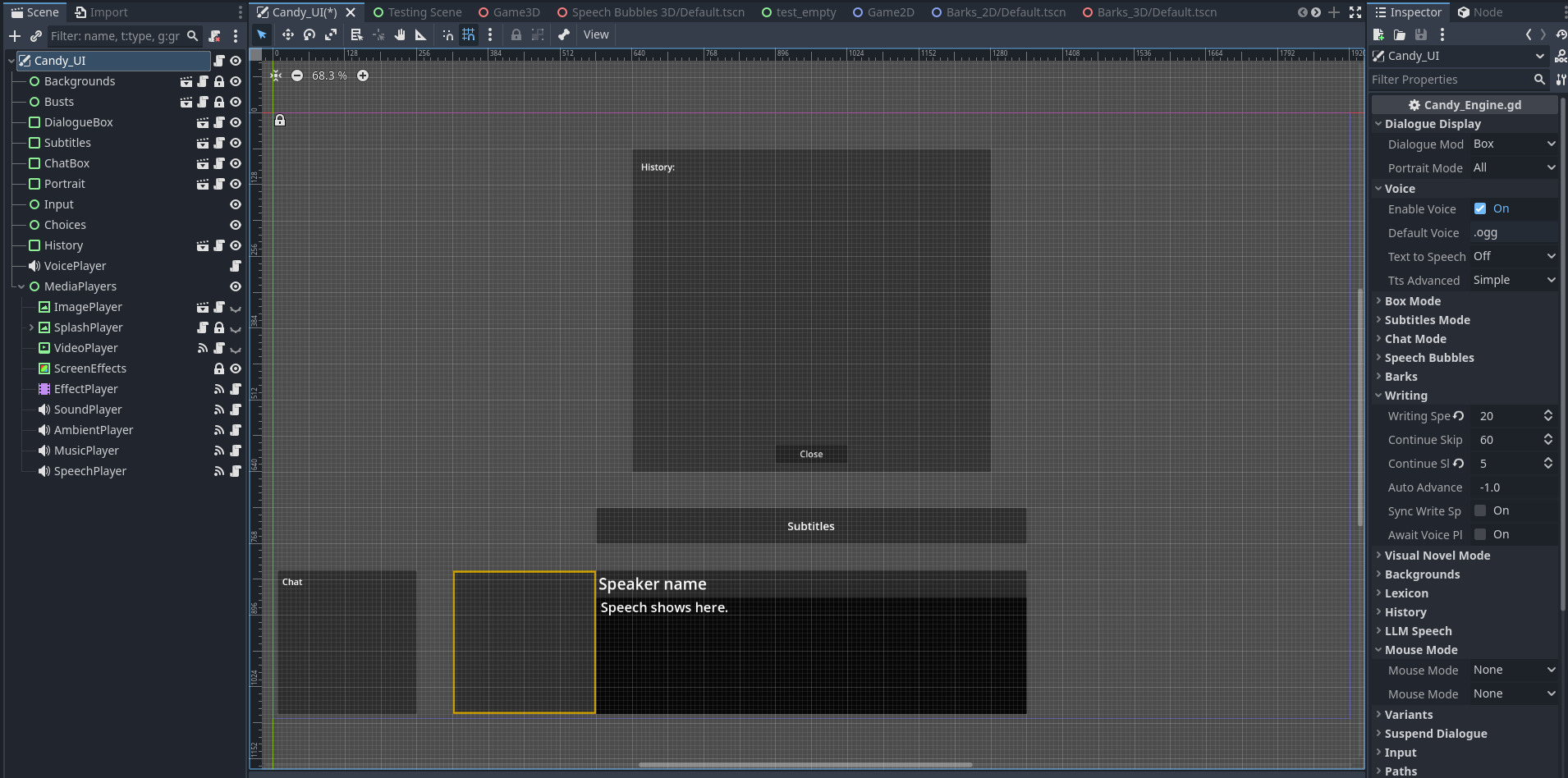
And you’re not limited to just one style: you can design multiple variations for each UI element, and swap them dynamically at runtime!
Default UI elements are provided so you can jump in immediately, and are kept simple so you can easily expand them in any manner you want.
Visual Novels
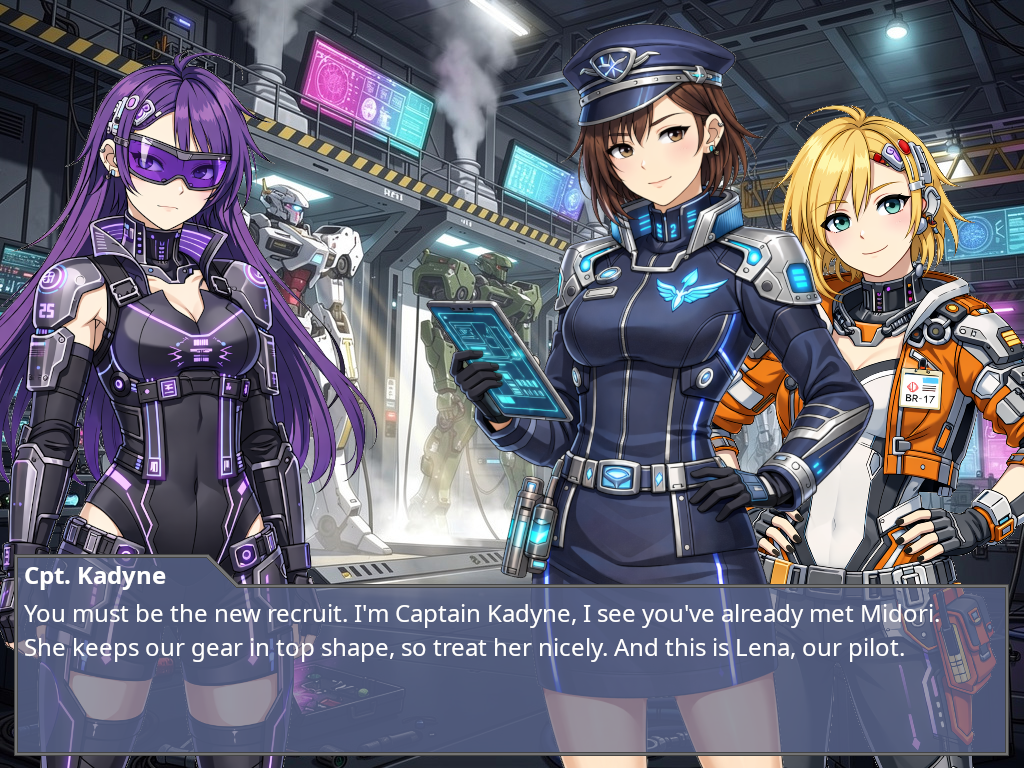
If you’re making a visual novel, Candy Dialogue Engine provides a full panel of commands to manage character busts.
First, create scenes with various image (bust) nodes, such as Sprite2D/3D, TextureRect, TextureButton for clickable characters, or even VideoStreamPlayer to be fancy.
Then, use special VN commands to control everything: swap scenes to change bust layouts, assign characters to bust nodes or move them to other busts, swap a character’s bust display for another posture or expression, animate or play effects on bust, and more!
Want to highlight the bust of the speaking character? You can choose among the multiple built-in options: move them to the front, change the size or color tone of the speaker’s bust, overlay an outline, display a name tag underneath — or create your own method!
You can also use AnimationPlayer nodes to create and automatically play visual effects when busts join, leave or switch places: slide or fade in or out of view, shake or hop, roll or pirouette… We’re not here to judge.
And if two dimensions is too restrictive for you, use the Cutscene commands, which allow direct control of any nodes and objects in game space, to create a 2.5D or 3D VN.
On a small side-note: it’s technically possible to create a Visual Novel entirely through Candy Dialogue Engine — main menu and all — without coding.
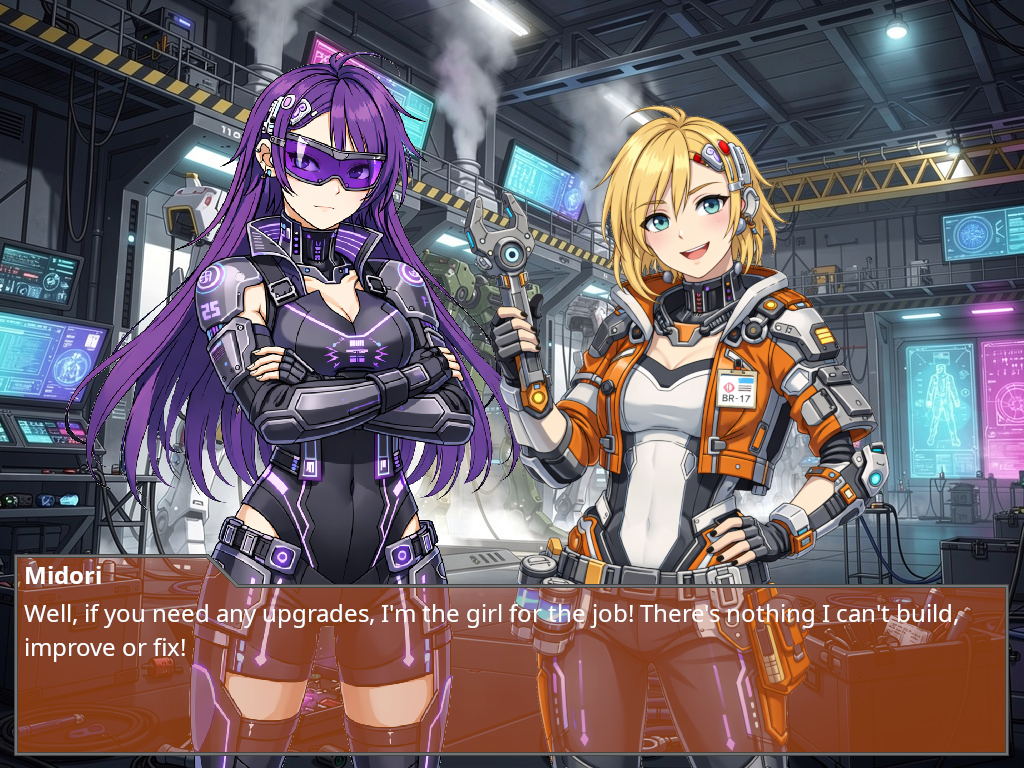
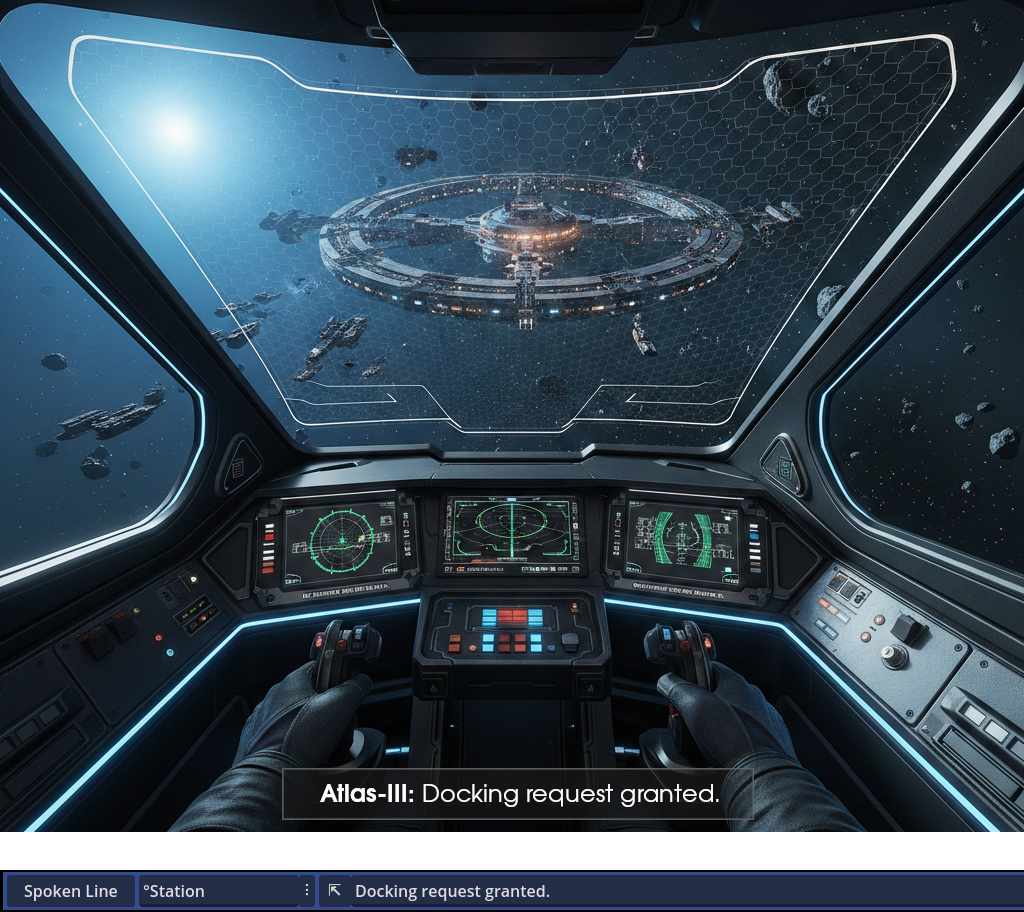
Speaker Roles
Sometimes you just don’t know in advance which specific character will speak a given line. For example, when a line is meant to be spoken by the third party member and your game allows changing the composition of the player party.
No problem! Just assign a speaker role to the line, and later assign a character to the given role at runtime. And just like that, whoever is the third party member when the line is processed will be the speaker of that line!
Dispositions
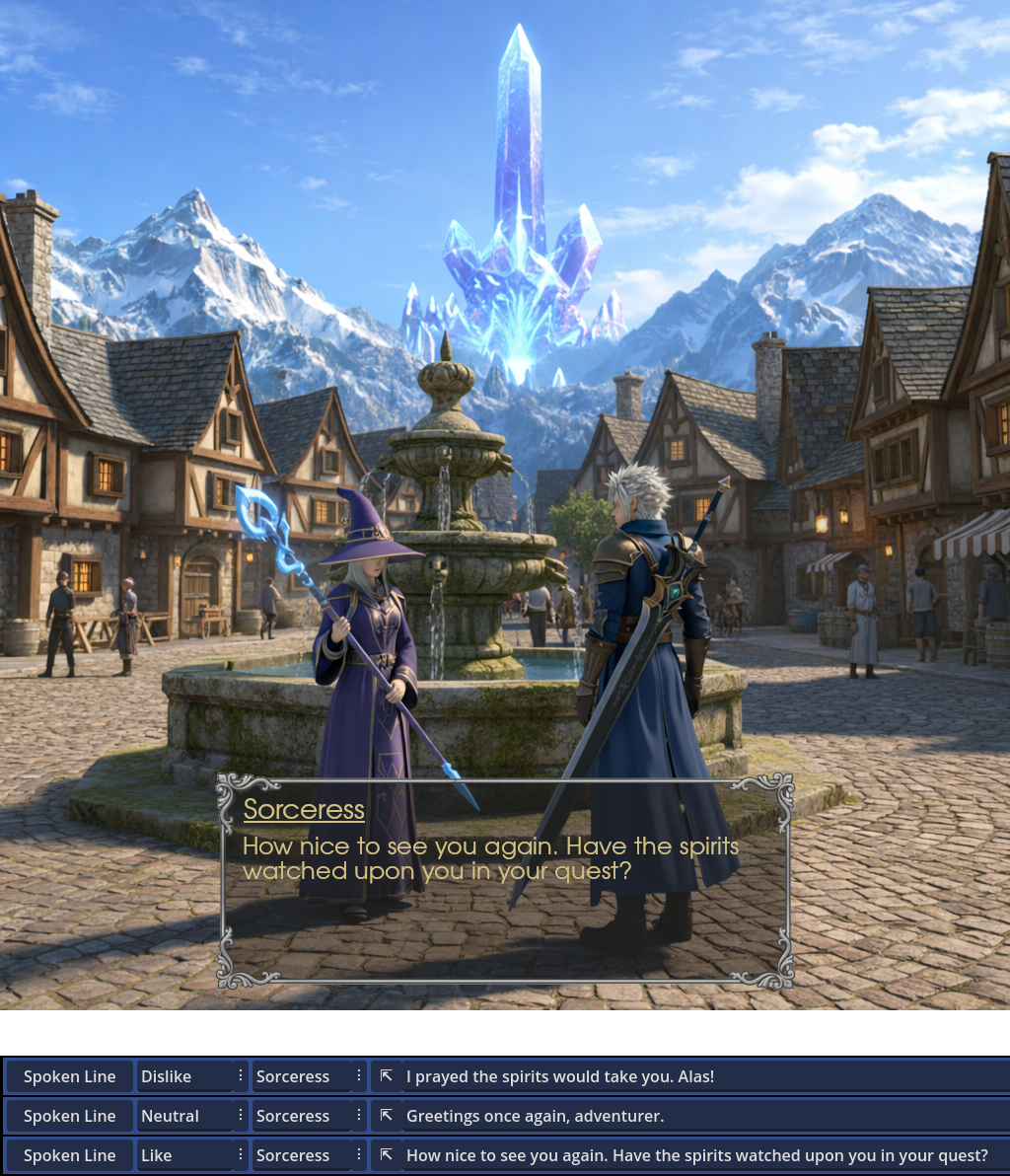
Want a character to speak differently if they’re happy or angry? Want them to only tell a secret if they like the player? Easy: assign a disposition to any line, and it will only be displayed on screen if the speaker’s disposition matches!
And for more advanced games, take things further: assign multiple dispositions to lines or actors, and use intuitive operators to require matching some, all or none of the listed dispositions, all in a single string.
Word Substitution
Gendered language is the bane of dialogue writers: it often requires writing duplicate lines for each potential option, using complex databases, injecting unintuitive syntax in your texts…
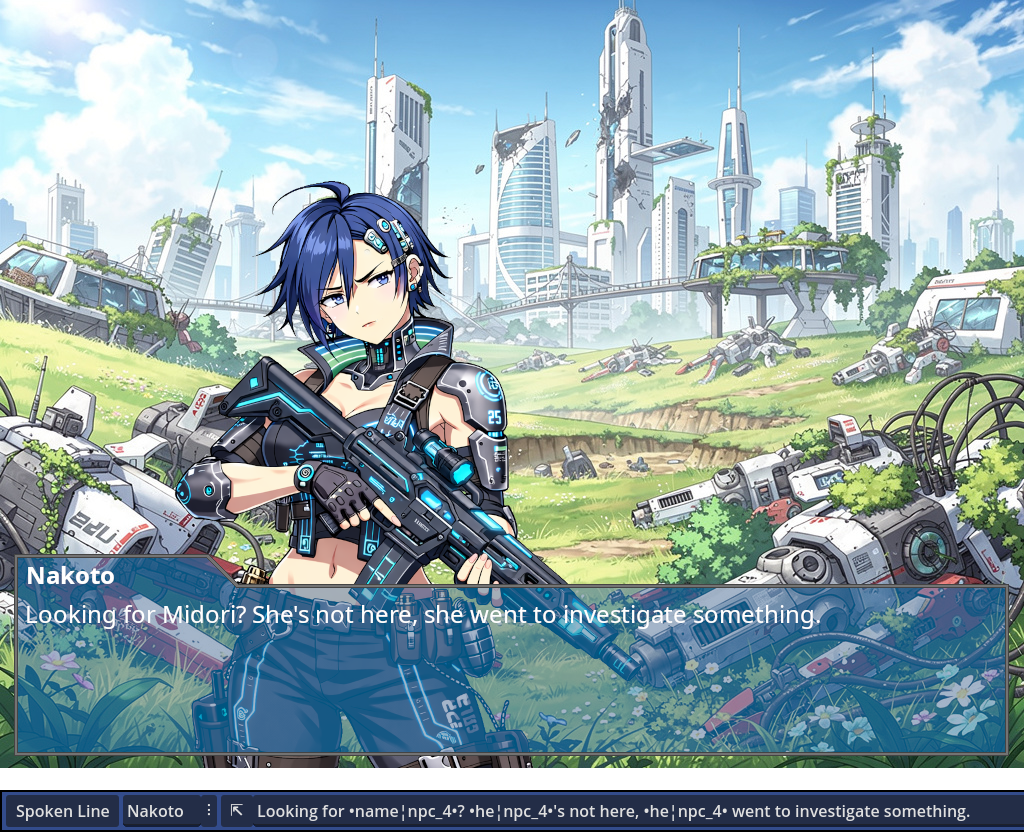
Good news! Candy Dialogue Engine features a smooth solution. First setup an entry in the Substitution Table, then:
1) Write a gendered word.
2) Write which character it refers to.
3) Wrap it in a couple of symbols.
That’s it! Candy Dialogue Engine will look up the gender of the designated characters and match the words accordingly. It even features automatic case matching, so you don’t need to create duplicate entries when words are capitalized at the start of a sentence.
And of course, the symbols are customizable for your convenience.
It’s also not limited to gendered language only: it can compare any keyword to any character property, perform substitutions based on multiple properties, and make comparisons between numerical values — perfect for displaying a title based on age or level.
To top it off, substitution rules can be made language-specific to avoid conflicts between translations.
Lexicon
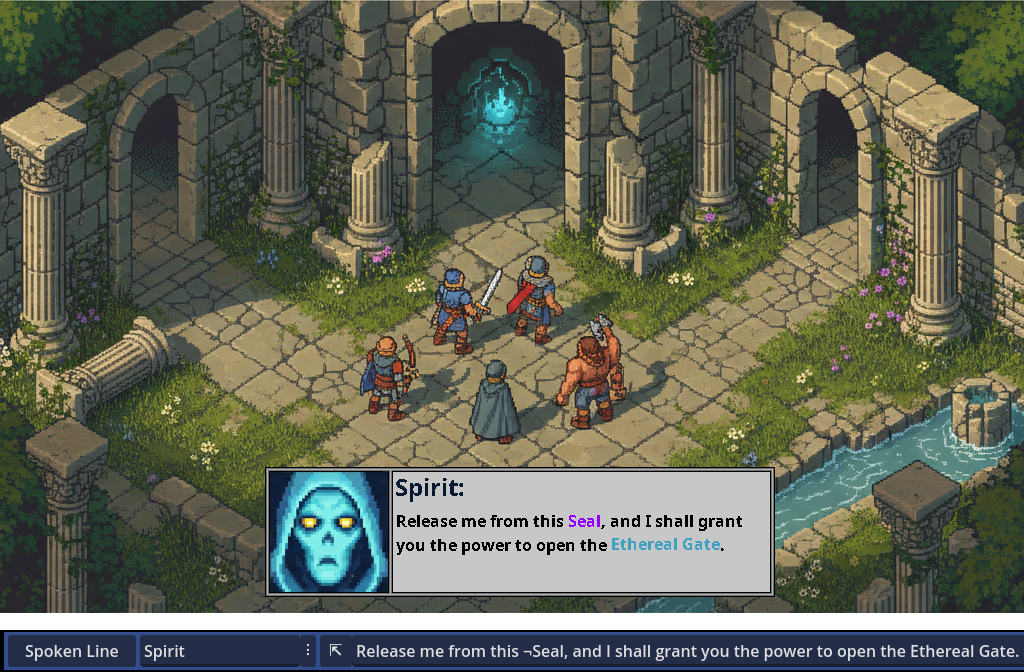
The Lexicon is a dictionary of keywords that can be automatically stylized when displayed on screen, using BBCode tags.
Each keyword can be styled with a custom size, font, bold/italics/underline, text/highlight/outline color, or anything else BBCode supports, including tooltip display when hovered.
Candy Dialogue Engine can even make keywords clickable, and you can freely code any effects you want upon clicking.
The Lexicon also provides a simple and convenient method to prevent words from being stylized as Lexicon keywords depending on context: prefix Lexicon keywords with a symbol of your choosing, which won’t be displayed on screen. Words not prefixed will display as normal.
Translations & Variants
With Candy Dialogue Engine, even translating your game is simple: each spoken line can be assigned any number of variants, which can act as translations, alternate phrasings, or stylistic rewrites of the same text. Indicate the variant to display with a single variable, et voilà! Your characters can now speak French or any language you include!
Candy Dialogue Engine also supports right-to-left writing: specify the default text direction in the engine settings, and optionally make exceptions for specific lines.
Variants aren’t just for translations: you can use them to automatically swap between masculine/feminine derivations, or according to character personality or moral alignment. Or use the built-in randomization feature to switch between multiple variations at random, to make frequently repeated lines feel more diverse!
In addition, if you use voice files for dialogues, Candy Dialogue Engine can automatically find and play files for alternate variants, saving you or your translators the long work of manually assigning voice files to lines!
Voiced Dialogues
Of course, voiced dialogues are supported: just assign voice files to lines, or hook to a Text-To-Speech tool of your choosing! And optionally synchronize dialogue writing speed with voice playback duration for a more polished feel!
And since we know how tedious it is to match lines and voice files, Candy Dialogue Engine’s folder structure keeps everything organized for you: voice files are grouped by actor, then by conversation and dialogue block. The companion Candy Dialogue Creator automatically filters and displays the available files for each line, complete with built-in “hover to preview”. Meanwhile, voice files for translations or line variations are automatically resolved by the engine at runtime, based on the originals, saving you hours of extra work!
The result: no spreadsheets, no obscure line IDs or fragile indexes, not even any typing required. Fully edit dialogues without risk of breaking anything, and preview voice files while writing for perfect tone, pace and sentence matching!
Variables
Candy Dialogue Engine takes variables seriously:
First, whether variables are stored inside global scripts (autoloads), nodes, or inside Candy Dialogue Engine’s own internal dictionary of variables, they are always accessible.
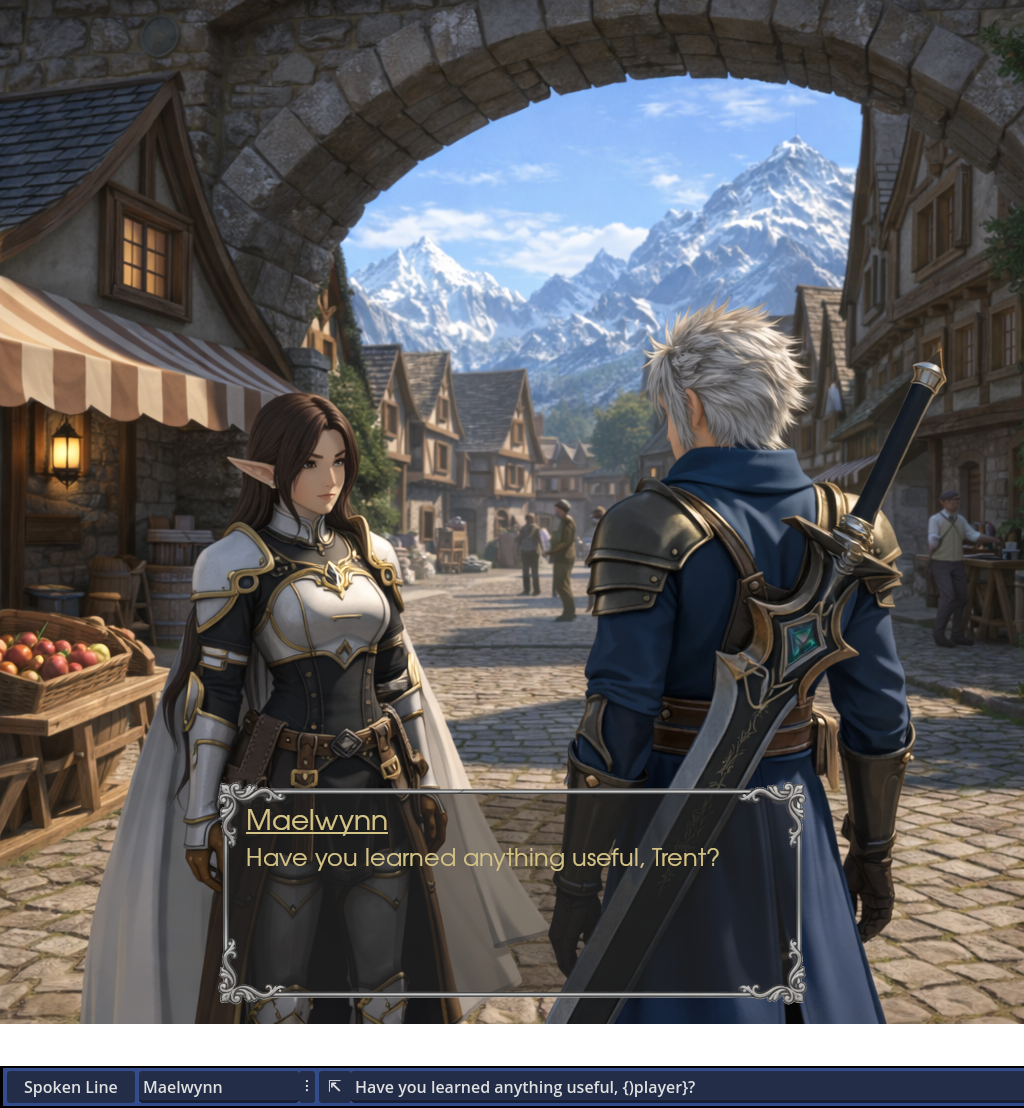
Display any variables in spoken text, using customizable symbols (similar to BBCode tags), or modify them using commands that support not only GDScript-style syntax, but also a few custom operators, including a method to convert interchangeably between Dictionaries, Strings and Arrays!
For complete power and control, use variables for any element of command data, making it possible to use dynamic values that change at runtime for every parameter!
Progression Flags
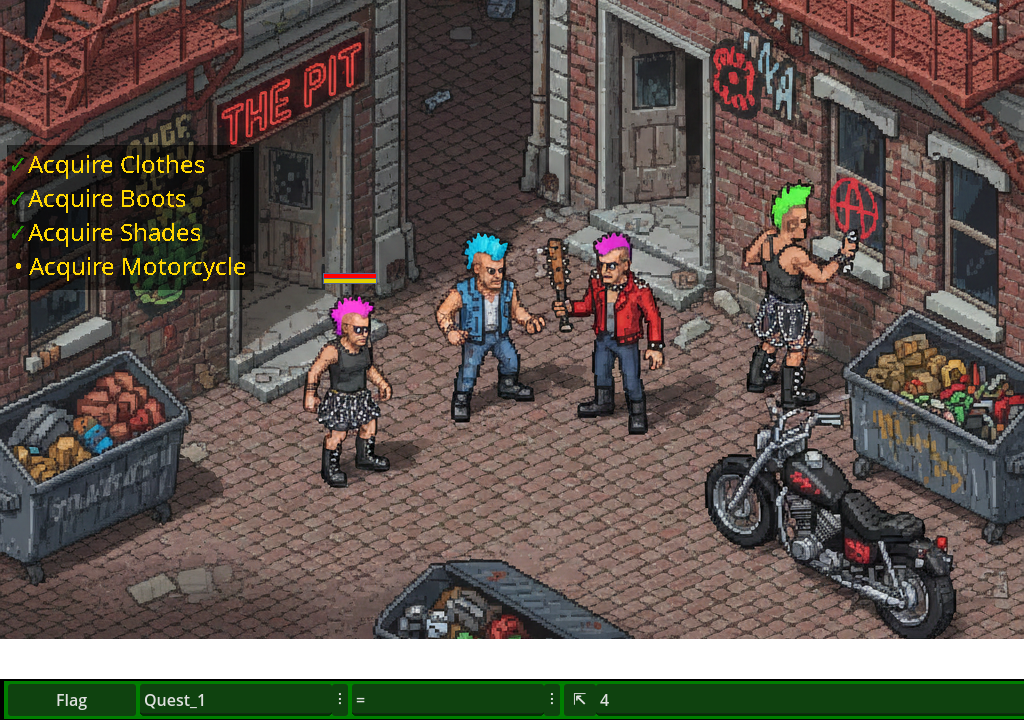
An optional dictionary is provided for progression flags, which pairs with a special command to quickly modify their values.
Instant flag updating during dialogue, fast and minimal writing, and support for a wide list of operators and variable types, including arrays and dictionaries as flag values!
And for maximum convenience, the command automatically calls a hook function, allowing you to automatically run custom code when flags change, such as updating quest trackers.
Conditions
What would a dialogue system be without conditional branching? Candy Dialogue Engine provides command lines to replicate ‘if/elif/else’ conditions, as well as ‘for’ and ‘while’ loops! Not only that, but conditions can be nested inside one another, and support elaborate conditions, with parentheses and ‘AND’, ‘OR’, ‘XOR’, and any operators, just like GDScript!
Use conditions for anything: modify variables, call functions, emit or await signals, or transition to other dialogue Blocks that can feature and run any dialogue command!
Dialogue History
An often secondary but standard feature in dialogue systems: Candy Dialogue Engine can automatically save and display dialogue history. A default implementation is included, or you can create your own menus to display the history log, take advantage of our expandable functions to tailor your own text formatting, and even customize what lines and data get saved.
Player Input
Need the player to enter their name, a password to a secret cave, or write a good joke? Just create input UI elements, and make them appear mid-way through dialogues with a single line.
The input logic is entirely up to you: restrict, allow or modify any text inputs based on any criteria you wish, from words or specific character types, to input length. You’re not on your own, though: Candy Dialogue Engine’s default input UI comes with a script that features many options, and is easily modified to serve as a template or expand upon.
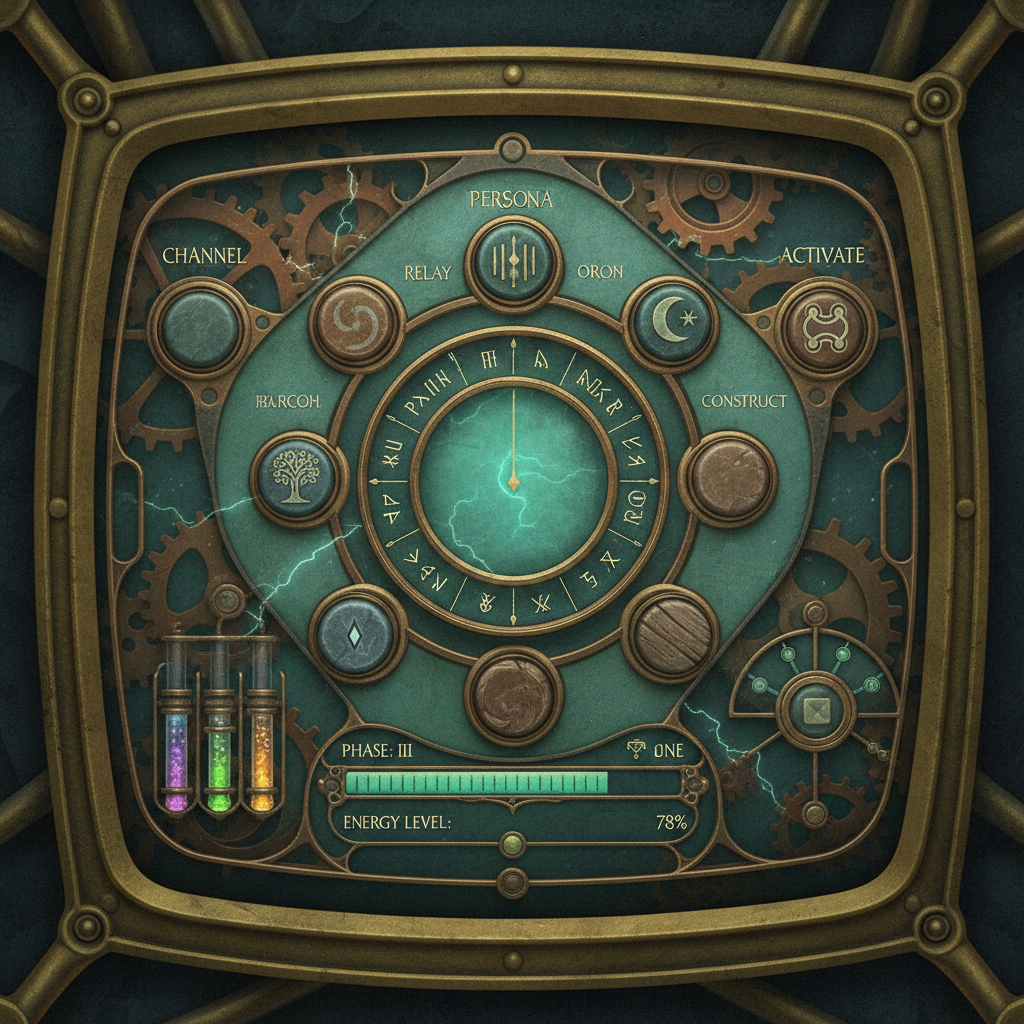
It’s not limited to entering text or numbers: create any player-interactive UI you want, packed with advanced internal logic of your own. Virtual buttons, dials, sliders, movement controls, drag-and-drop… Any input form is compatible. Design and display UIs for virtual keypads, radio transistors, mechanical devices, crafting tables, MIDI mixers, musical instruments, vehicle cockpits, even mini-games, and more!
Input UIs can communicate with the dialogue engine through a signal, allowing inputs to trigger dialogue commands, character speech, or affect the dialogue script. Even better: you can swap through UIs, display and use multiple UIs side-by-side, or create modular input systems!

Player Choices
Player choices are a staple of any comprehensive dialogue system, but Candy Dialogue Engine takes things further: fully customize choice menus and buttons, display as many choices as you like, group them in categories, and make them run any dialogue commands, including modifying variables or calling functions.
Not enough? Let choice menus configure themselves when they initialize, using conditions and dialogue commands. You can use this to skip, deactivate or hide unavailable choices, or to limit or randomize the choices offered. You can also set timers to trigger effects or auto-select choices, and you can nest choice menus within one another.
Special dialogue commands are also available to alter choices and timers, allowing them to modify one-another when selected or timed out. These commands can further be used to run conditional, weighted or randomized logic to limit or select available choices — wide power and control in a small package!
Media Synchronization
Most dialogue systems focus on dialogue display entirely, leaving you to figure out how to synchronize speech with media or real-time game events properly.
Candy Dialogue Engine saves you that pain: various commands can be used to play videos, sounds, or display images. Not only that, but additional commands are also provided for precise control: pause dialogue processing until a specific media finishes playing or reaches a specific timestamp or frame; or do the opposite and pause media until a specific number of dialogue lines have been processed.
There’s also commands to change media volume or skip to a specific timestamp or video frame, and to hide or show dialogue UI elements.
And there’s even a built-in solution for animated images, using automated image swapping and customizable FPS rate: just place image frames in a same folder, point the image display command to it, and let Candy Dialogue Engine do the rest!
Direct Cutscenes
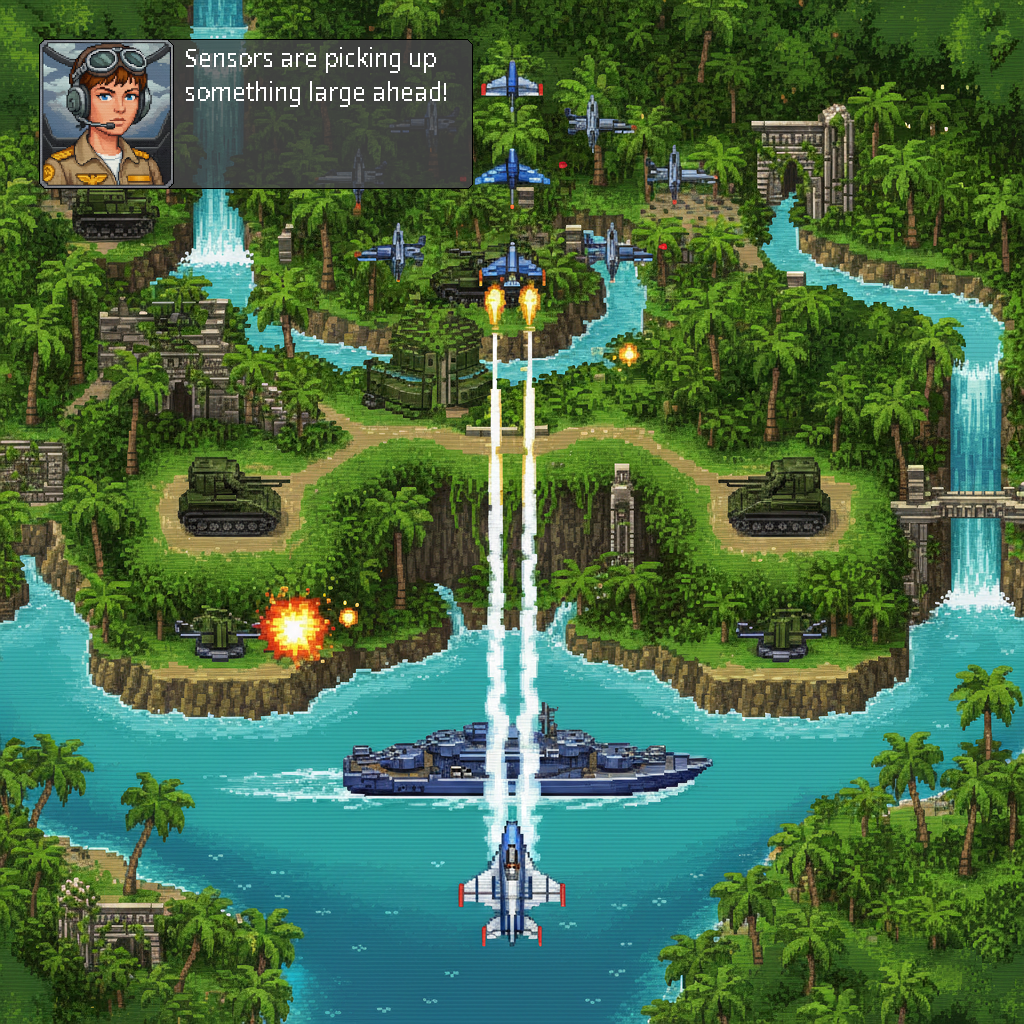
Media controls only scratch the surface of Candy Dialogue Engine’s capabilities: commands are also featured to instantiate scenes, move or animate characters or objects in the game world, toggle visibility, change the active camera, or modify lights. This works for both 2D and 3D, and adapts to your node hierarchy, whatever it may be.
The result: real-time cutscenes can be scripted entirely through dialogues by alternating spoken lines and cutscene commands. Winning a movie award by making video games has never been easier!
Effects & Backgrounds
Just like media and cutscenes, commands are provided to play visual effect animations on screen, such as color flashes, fading to black, shaking, or any other effects you wish to achieve.
Commands also make it possible to change or animate backgrounds. And not only that, but Candy Dialogue Engine supports any number of background layers, and can use either a general AnimationTree for all layers, or AnimationPlayer nodes for individual layers.
LLM (AI) & TTS Support
Games are starting to use Large Language Models to generate character speech, and Candy Dialogue Engine is ready for them: enable LLM mode and Candy Dialogue Engine will query an LLM of your choosing, then display its response as character speech. Of course, you have the option to write your own code logic to craft custom prompts and use dialogue data to provide context, and you can add steps to evaluate LLM outputs for errors or problems, then edit or re-query as needed.
Likewise, if you integrate a Text-To-Speech solution into your game, whether built-in or through an external API, you can let Candy Dialogue Engine use it to speak lines out loud. BBCode and any other tags will be automatically omitted when passing a line to your TTS tool, or you can write and pass specially-written TTS line variants for fine-tuning of rhythm, tone, and other speech parameters!
And where you want further control, lines and characters can be individually forced or exempted to use LLM-generation and Text-To-Speech, regardless of the general settings.
Note that connecting your game to an LLM API, integrating a TTS solution, and writing the query functions is left to your care, as this is highly specific to each project and outside the scope of a dialogue system. If you have no experience implementing such features, it can be accomplished within an hour with AI assistance.
Game State Tracking
For projects that use a Game State tracker, Candy Dialogue Engine features an externalized function that can be customized to modify Game State appropriately when dialogue starts or ends.
Saving & Data Export
Dialogue commands are provided to export or import any dialogue or project variables to or from text files, supporting a wide number of formats: JSON, TXT, CSV, CFG, BIN, INI, BASE64, and even TRES or RES.
Importing can be set to update runtime variables directly, or to store the data in any dictionary for other uses.
This makes it easy to print debug logs or dialogue history, or to create a save/load system.
Parallel Dialogues
The engine core code is self-contained, making it possible to run multiple dialogues at the same time. Just attach the script to different nodes, each with their own display UI elements, and call the dialogue start function on any instance as needed.
No variable conflicts, no fighting for the same UI! Just cleanly separated conversations taking place in turns or simultaneously!
Perfect for NPC ‘barks’, groups having their own private conversations, multiplayer games and even running background dialogues as mods!
Modding
Candy Dialogue Engine’s capabilities natively enable it to be used as a modding layer:
Configure your game to run player-made dialogues at startup, at other strategic points, or even manually, and players will be able to use all the dialogue features to alter the game at runtime: modifying variables, calling functions, condition checks, and everything else!
Implementing this feature is absurdly easy: program your game to scan and detect player-made dialogues, and for each of them, automatically create an instance of the dialogue engine script, then run them all simultaneously. It’s then up to your players — not you — to design these ‘mod dialogues’ to work properly with your game.
The function for loading dialogues from .txt files is built-in, so you’ll only need to write the folder scanning and engine instantiation code. You don’t even need to expose variables or functions, since dialogues can access any of them from the project root.
And if you go further and implement a method for your game to load player-made Godot scenes and other resources, your players could even add their own custom UIs or import custom-made functions for their ‘mod dialogues’ to call!
Not only is it easy to make your game moddable this way, but this will also work for games that were not designed with modding in mind from the beginning.
And in case it’s not clear, using Candy Dialogue Engine for modding doesn’t require using it for normal game dialogues: modding will work even for games that use third-party dialogue systems, home-made dialogue code, or even no dialogues at all.
Live Dialogue Editing
Modify dialogues even as they are being processed at runtime! At their core, dialogues are just nested dictionaries and arrays, and Candy Dialogue Engine reads and processes a single line at a time. You can therefore make a dialogue line modify any upcoming lines, or even add or remove lines!
If that’s more technical than you’re comfortable with, this is an optional feature for special, advanced uses. Modifying dialogue scripts in any way at runtime is not required by any of Candy Dialogue Engine’s functionalities.
Your Code
Full access to the engine code is provided, allowing you to modify it any way you like. Creating your own custom commands or custom dialogue styles is done by adding elements to match statements and doesn’t require modifying any of the existing code otherwise, making the process clean and risk-free.
Importantly, Candy Dialogue Engine adapts to your projects instead of expecting them to bend to it, and the ease of modifying the code guarantees that you can always make it fulfill your needs, without being dependent on official updates.
All code is written in GDScript, making it accessible to all developers working in Godot.
Seamless Integration
Candy Dialogue Engine never touches the rest of your project: it doesn’t modify your code, your variables or your scenes. Your project calls on it when needed, and tells it how to adapt. In other words, Candy Dialogue Engine is entirely self-contained, doing its thing while being aware of its environment.
The best measure of this is how easy it is to remove from your project: just delete the Candy Dialogue Engine scripts and scenes, and unless you’ve specifically designed something to depend on Candy Dialogue Engine, nothing will be left broken or in need of reconfiguration.
Future
Long-term reliability is essential when you choose a tool like this. It’s what we’d expect as users, so it’s what we’re determined to provide:
• Candy Dialogue Engine will always be updated to support new Candy Arts products where relevant, and to remain compatible with Godot 4.
• Additional features are planned and in the works, including multiple new dialogue display modes. See our roadmap for details.
• We also listen to user feedback: in fact, we’re counting on it! We’ll gladly add requested features or improve support for unique project needs.
• Importantly, we want to ensure updates will always remain compatible with your dialogues, so that you never have to choose between re-editing all your work or passing up on new features. The code is carefully crafted to be future-proof, and in a worst-case scenario we’d be able to provide patching tools to automatically update your dialogues in a couple of clicks.
• And the absolute guarantee: you can always modify the code yourself to fix any issues or customize features. We have no intention of letting bugs linger and we have long-term plans for Candy DE and Candy Arts, but you can rest easy knowing you don’t depend on us.
Candy Dialogue Creator
Instead of featuring an in-Godot UI, Candy Dialogue Engine relies on the standalone Candy Dialogue Creator — a GUI that makes dialogue writing and translating fast and easy.
Among its notable features, a) lines can be added in one click or moved or duplicated just as easily, b) writing doesn’t require typing special syntax, c) it can read your project files to display previews of media files like portraits and voice, or to generate data lists you can select from instead of typing d) it provides tools to create custom line, data or text string presets that you can insert repeatedly in one press of a button, and e) it lets you export dialogues directly to your project folders, including a one-click quick-testing option, and even provides various options to merge different dialogues into one.
For teams and studios, it also enables writers and translators to work without any coding experience and without any direct access to the source project files.
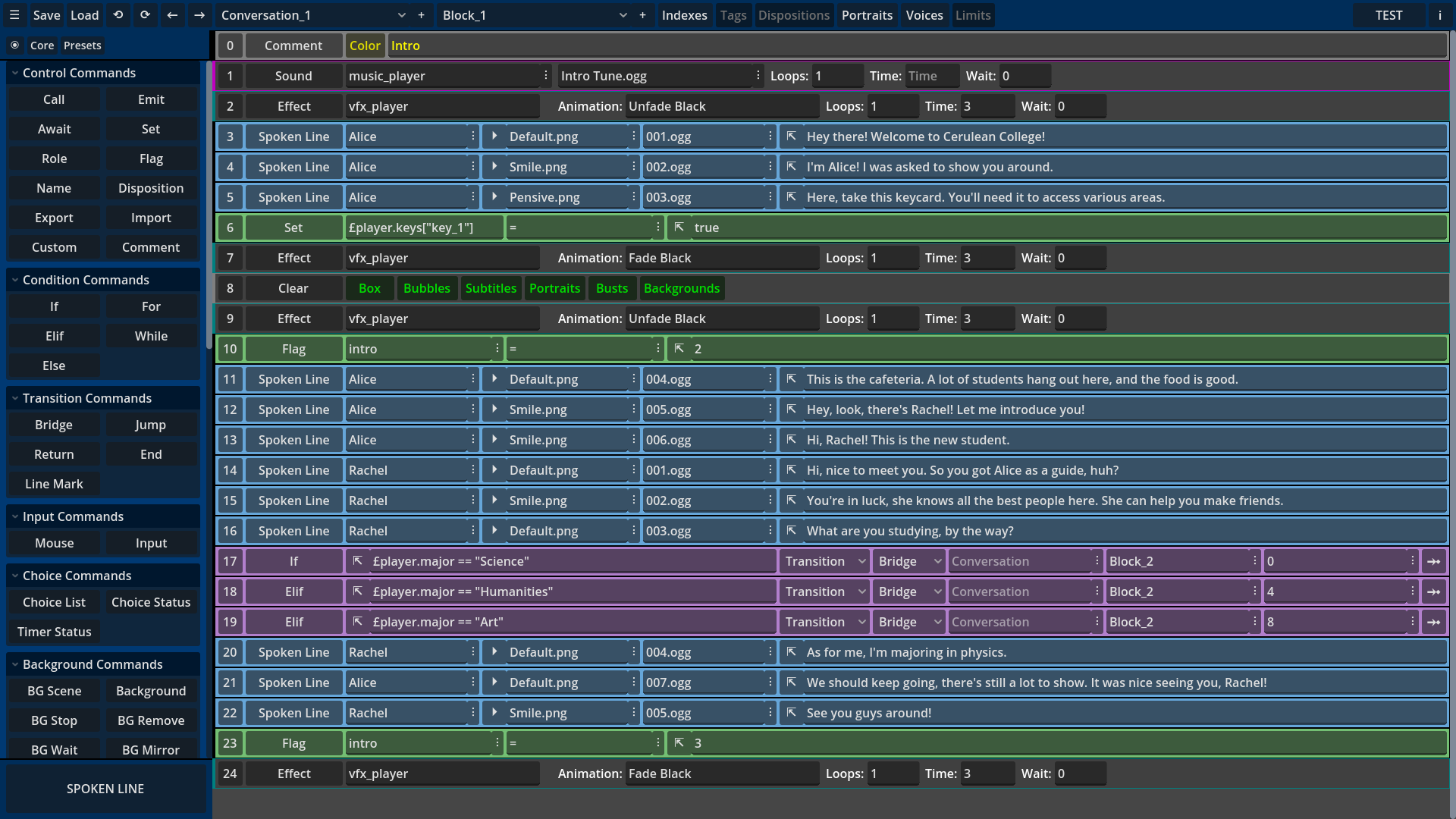
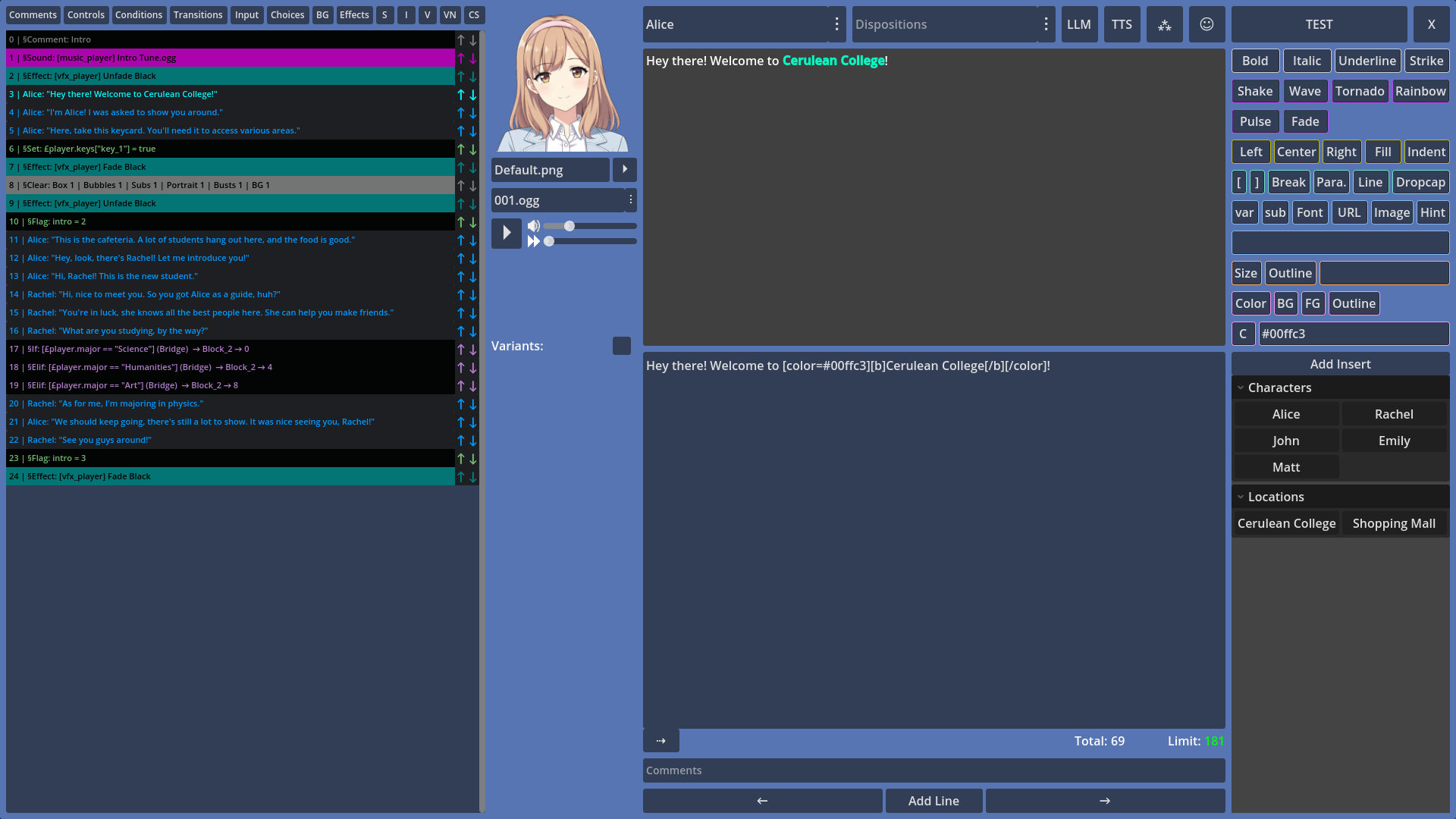
The standalone design offers more stability, removes the need to do writing or translation work in the Godot Editor, and works great for multi-monitor setups where you can work on your project in one screen, and write dialogues in another.
The Candy Dialogue Creator is open-source (MIT License) and completely free, so you may use it as much as you like, any way you like: change the look of the UI, add custom features or create your own edition. It can even be integrated directly into your game to be accessed at runtime!
That all being said, dialogues are editor-agnostic: they’re just dictionaries in GDScript format. This means that if you don’t want to use the Candy Dialogue Creator, you can create your own software/plugin/GUI, or even just use a text or spreadsheet editor. Whatever solution you choose, it just needs to create a text file with dialogues formatted the way Candy Dialogue Engine expects.
Pricing
Free Indie License (Indie projects, max €5000 budget, non-commercial use only): Free
Starter Indie License (Indie projects, max 5000€ budget, commercial use authorized): €100 €50 during pre-release
Pro Indie License (Indie projects, max €25 000 budget, commercial use authorized): €500 €400 during pre-release
Studio License (all projects, unlimited budget, commercial use authorized): 2.5% royalties.
Features are identical across all licenses.
Indie Licenses are valid for one individual. They last a lifetime and can be used by the same license holder for unlimited projects without additional payment.
Studio Licenses apply per project and have no seat limits. Royalties are calculated only on the project’s direct revenue. Studio projects that earn 0 pay 0.
See our Licensing page for more details.
Compatibility
Godot:
Candy Dialogue Engine is compatible with Godot Engine 4.
• It was developed and tested with Godot 4.5.
• Based on the official Godot upgrade documentation, it should be fully compatible with all Godot 4 subversions.
• It will always be updated to maintain compatibility with newer Godot subversions.
Operating System & Hardware:
Dependent on Godot: hardware and operating systems that can run Godot can run Candy Dialogue Engine.
Performance:
Candy Dialogue Engine is very light: it mainly just displays text in RichTextLabels, assigns textures to nodes, and plays media and animations in VideoStreamPlayer, AudioStreamPlayer or AnimationPlayer nodes. None of its processes are heavy in computing power or memory.
Note: screenshots on this page are provided for illustrative purposes. As such, they may include ai-generated art assets, such as characters and backgrounds, overlaid with UI elements using Candy Dialogue Engine’s capabilities. Depicted art assets are not included with Candy Dialogue Engine.