Coming Soon!
Candy LLM is scheduled for release in September 2026.
Stay tuned for updates!
Candy LLM
Godot Project ↔ LLM API Runtime Connection Bridge
Candy LLM enables your projects to connect to an LLM API, for any purpose:
- Compatible with almost any cloud or local API.
- No restrictions: craft prompts and use LLM outputs freely in your project.
- UI for configuring connection and model settings.
- Built-in connection presets + Create your own.
- Capable of LLM streaming.
- Connect and query multiple APIs at once, for different purposes.
- Included demo scene.
- Can be used with Candy Dialogue Engine’s LLM features.
Note: Candy LLM is not an agentic coding tool or a ready-made chat program.
It only handles the connection between your projects and LLM APIs. Your game must craft prompts (e.g. from player inputs or pre-written dialogue cues) and make use of LLM outputs for the purposes you want (e.g. display them on screen).
Some knowledge of LLM models is required:
• You need to understand what kind of information prompts should include.
• It helps to understand model settings (e.g. temperature, min p, etc.).
• You need to be aware of the risks inherent to LLMs and connecting to cloud or third-party APIs.
Setup
Candy LLM is just made of a few scenes, which you can make into autoloads or add to other scenes in your project.
Prompts
Candy LLM is simple to use: call a function to query an LLM, and pass a prompt as an argument.
Crafting prompts is left to your project’s responsibility, but isn’t difficult either: you just need to write code that concatenates strings together. Those strings can include instructions for the LLM, variables or other dynamic data, user-written inputs… It just depends what you’re trying to do.
Outputs
The query function returns the LLM’s output back to your project: all that’s left to do is make use of it.
Once again, it depends what you’re trying to achieve: display the output on screen for the player to read, use the output as data for your code to process… Candy LLM doesn’t lock you into limited uses: your project can use an LLM for any purpose as long as you know how to program it.
Configuration Menu
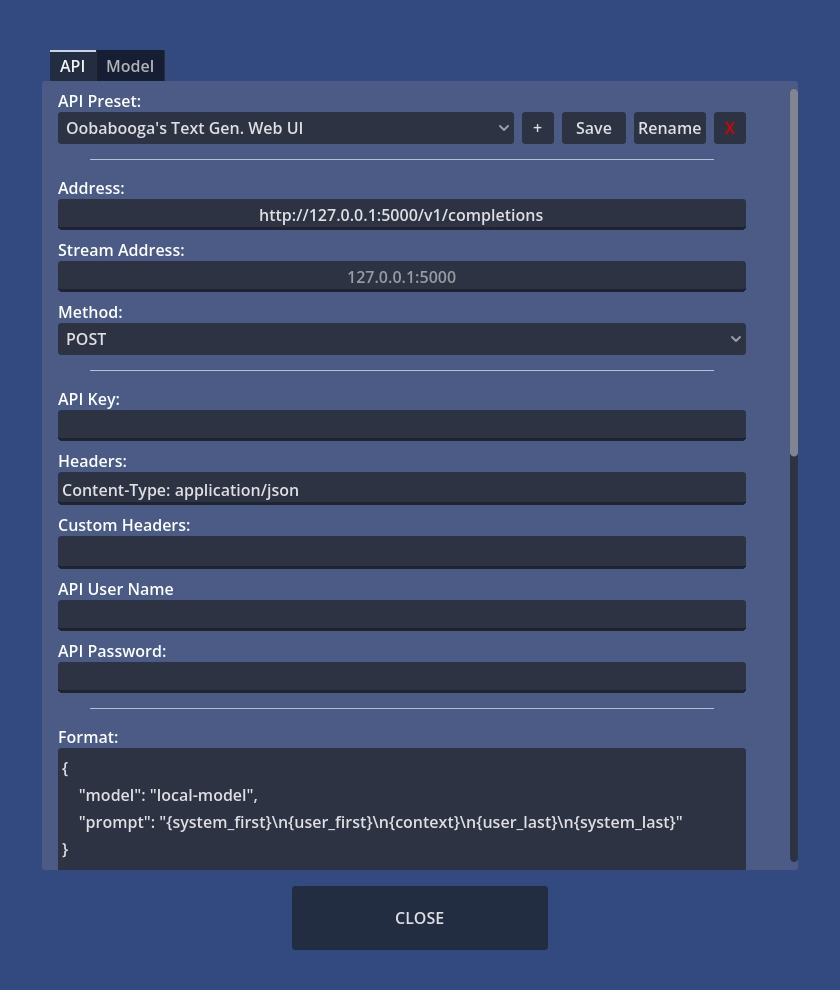
A basic, functional UI is provided, in the form of a menu for configuring API connections and LLM model settings.
Since we assume you’ll want to make the UI match the visual style of your game, it’s designed to be minimalist: this makes customization much more straight-forward.
The UI is also designed to be easy to integrate into your game’s own UI: it’s two menus, which are standalone scenes with PanelContainers as root nodes. As an example, you can add them as tabs into a settings menu.
As a bonus feature, the UI adds a button to test the connection to an API, using the selected presets.
If you’d rather recreate your own UI from nothing, that’s also easy: the default UI simply creates and edits presets. The connection testing code is optional but can be ported to your own UI if you want to keep it.
Presets
Connection presets are provided for most popular LLM API. You can of course modify these presets or create your own.
A few example presets are provided for LLM model settings as well, but project developers or end-users (players) will need to create their own. Candy LLM can’t do this, as there are thousand of models in existence, and these settings are specific to Godot projects.
Technical Capabilities
LLM Streaming
Candy LLM comes with an alternate script compatible with LLM streaming, for when you want to receive (and display) LLM outputs as they are being generated.
Multiple Connections
Your project can connect and query multiple LLM at once, such as when you use LLMs for different purposes. Note that some API may not allow you to query them again while the LLM is still responding, so using different API might be necessary.
Candy Dialogue Engine
Candy Dialogue Engine is ready-made for LLM-generated dialogue: it only needs your project to provide the connection to an LLM — which is exactly what Candy LLM does.
Some basic code is provided, which you can copy/paste into Candy Dialogue Engine’s llm_query() hook function.
After that, just enable the use of LLM in Candy Dialogue Engine’s settings, write a bit of custom prompt crafting logic, and it will be ready to use!
Risks and Liability
Candy LLM is just a bridge — a neutral tool that blindly passes data between two pieces of software: your Godot project and an API.
Anything else is beyond its scope, and falls under the purview of your projects.
It’s intended to be integrated into Godot projects by qualified developers.
As such, there is an expectation that you understand the risks involved with tools such as Candy LLM, and will implement any required measures in your own projects to prevent them.
Misusing Candy LLM can involve the following risks:
• Candy LLM does not include any kind of safeguards, filters or parental controls. Such features are part of prompt crafting and LLM output use, which are the responsibility of your projects.
• Candy LLM does not include features to limit token spending. That’s also the responsibility of Godot projects. If you connect to an API that requires payment for token usage, you may accidentally over-spend if you don’t configure things properly.
• Candy LLM does not protect private or sensitive information in prompts. Anything you send to an API through Candy LLM can be read by that API service.
• Candy LLM does not encrypt or otherwise protect information saved to disk. This includes API keys, user ID or passwords. That information should not be saved on shared devices.
• Connecting to an unsafe server can harm your computer. Candy LLM does not include any protection software against spyware, viruses or other malicious programs.
User Liability:
• Users assume full responsibility for their use of Candy LLM, and the use made by their projects’ end-users (e.g. players).
• Users must ensure their use of Candy LLM fully complies with applicable law.
• Candy Arts is not responsible for any use of Candy LLM or any issues arising from it, including in case of bugs.
• By using Candy LLM, users declare they understand all the risks Candy LLM may involve and its limitations, including those not explicitly listed, and that they will implement safeguards or other safety features as required.
Pricing
Indie licenses:
• Candy LLM costs €20.
• This includes all Indie license tiers (Free, Starter and Pro), and no additional payment is required when upgrading tiers.
• Indie Licenses are valid for one individual. They last a lifetime and can be used by the same license holder for unlimited projects without additional payment.
• Indie licenses are a special offer to support small projects, priced considerably below the value our assets provide. See the Indie Project Checklist to determine if your project qualifies.
Studio licenses:
• Candy Loot is a Minor Asset. Studio projects can use our Minor Assets freely as long as they pay a minimum royalty rate of 1%.
• To clarify: Studio projects that already pay 1% or more for the use of other Major or Minor Assets don’t have to pay additional royalties.
• Studio Licenses apply per project and have no seat, budget or revenue limits. Royalties are calculated on gross revenue. Studio projects that earn 0 pay 0.
Features are identical across all licenses.
See our Licensing page for more details.
Compatibility
Godot:
Candy LLM is compatible with Godot Engine 4.
• It should be fully compatible with all Godot 4 sub-versions. If you encounter issues with a sub-version, please let us know so we can provide a fix.
• It will always be updated to maintain compatibility with newer Godot 4 sub-versions.
Operating System & Hardware:
Dependent on Godot: hardware and operating systems that can run Godot can run Candy LLM.