
Candy Loot
Advanced Random Outcome Generator
Candy Loot is a random generator algorithm.
Despite the name, it isn’t limited to creating random loot lists: it can be used to generate random outcomes for any purpose, such as characters, encounters, or procedural world locations.
It works by using a nested tables design, which are simple GDScript dictionaries that possess their own, individual configuration parameters.
It’s compatible with any game made in Godot 4, no matter what kind of inventory system you use, or the items that your game features.
Writing code that selects random values isn’t complicated, but a well-crafted random generator tool is invaluable and isn’t as simple to design.
The value Candy Loot provides is the amount of control it gives you over probabilities and potential outcomes, its computing performance, and the included testing tool:
- Configure drop amounts: minimums, maximums and weighted ranges.
- Make items always drop together or mutually exclusive.
- Various draw options: independent/relative weights, discard/recast…
- Multiple loot stacking options, with enforceable stack limits.
- Use variable references and expressions for table parameters, to be resolved at runtime (requires Candy Dialogue Engine).
- Write and read tables in external .txt files.
- Testing tool provides helpful stats on the odds and outcomes of loot tables. Results can be exported to CSV files.
- Very fast performance: tens of thousands of draws can resolve nearly instantly.
Note that Candy Loot is not an inventory management system. It only generates arrays of random data (e.g. items or character attributes). It’s your game’s responsibility to use that data for specific purposes (e.g. add the items to the player’s inventory, or create a character from the generated attributes).
For more information, see below!
Light & Easy
Adding Candy Loot to your project couldn’t be easier: drop it in your project folder, then add one script as an autoload in your project settings. That’s it.
Querying the algorithm is just as simple: call a function, and pass it 2-3 arguments to define which table to use and what logic to follow.
The only real work you’ll do is configuring the loot tables. These are just GDScript dictionaries, and they can do a lot with very little.
Full Game Compatibility
Candy Loot can work with any game or project. It doesn’t require a specific inventory system, and it doesn’t care what type of items exist in your game.
This is made possible by the fact that it knows what its scope is, and it stays focused on it: to generate a list of random outcomes (items). It doesn’t overreach by trying to sort items into your inventory system, or deciding what your item database should look like: that should be fully controlled by your game.
Simple Design
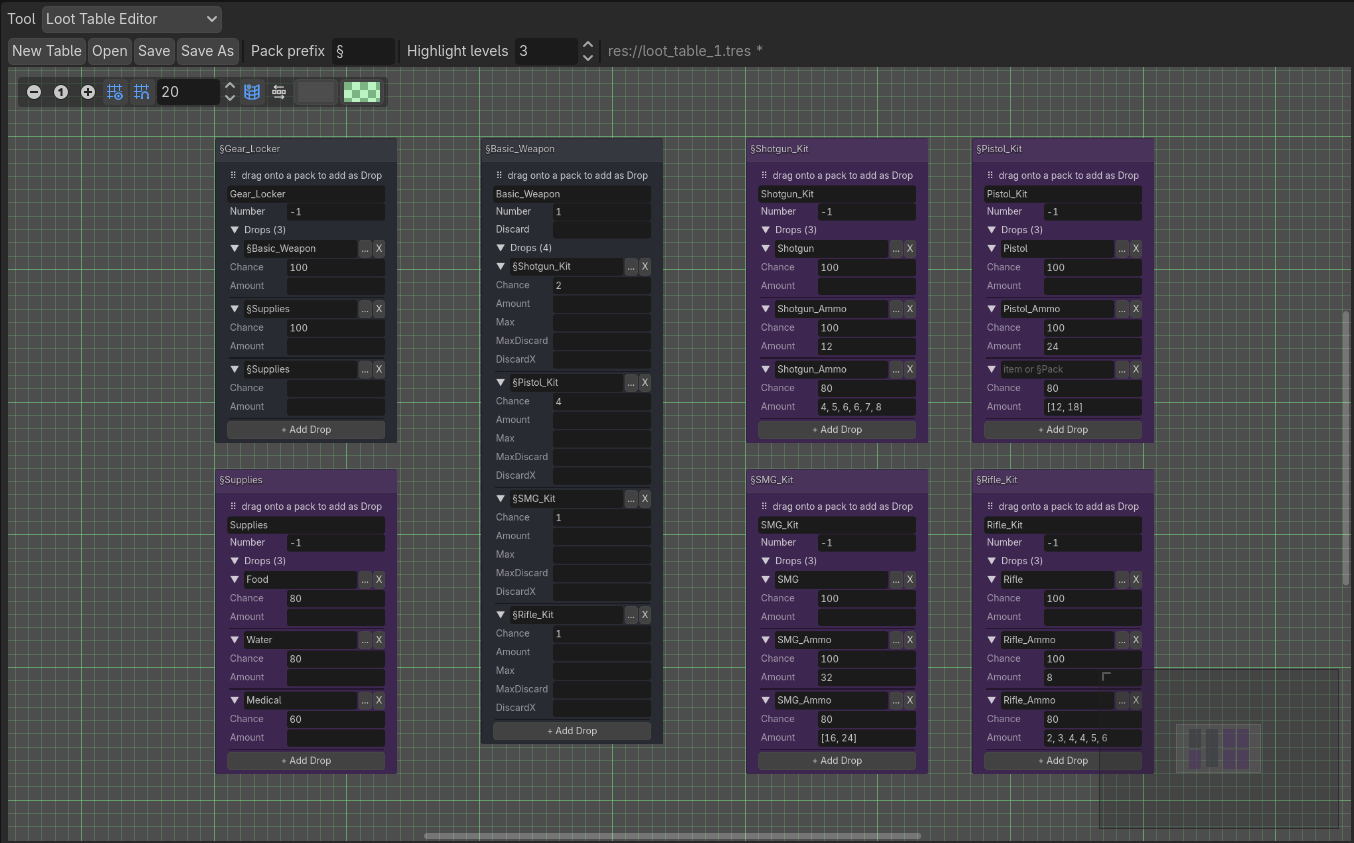
Tables work by organizing items into ‘Packs’, which are just smaller dictionaries. Packs can contain other Packs, creating a nesting hierarchy that gives the Candy Loot algorithm a lot of it power.
Packs also feature a small number of keys to configure how loot is drawn: drop chances, amounts, or draw method. These keys are optional, in order to keep loot tables small and simple.
Together, these features enable infinite possibilities.
Draw Modes
Candy Loot can use different modes for drawing loot: Independent, where each item has its own chances of being drawn, or Relative, where a limited number of items are drawn among a larger pool.
Further options allow you to assign weights to items or remove their entries from the pool — with customizable number of entries to remove!
Adjustable Odds and Amounts
You can of course configure the chances of each item of being drawn, either as an absolute percentage or as a weight relative to other items.
You can also precisely configure the amounts items can be drawn in, using ranges or absolute values, but also the odds of each amount.
Lastly, you can define maximum caps to how many times items can be drawn.
Join & Exclude Items
Need to make sure weapons drop with matching ammunition, or that defeated enemies never drop more than one piece of armor?
The nested tables design allows you to ensure specific items are always drawn together or can never be drawn together.
It’s very intuitive to setup too: just create a table for each weapon + ammo combo, or place multiple items in a table that is configured to draw only one.
Dynamic Table Data
In GDScript, when you assign a variable as a value to a dictionary key, it gets resolved when the dictionary is initialized (i.e. when the game starts or the scene loads). That means if the variable’s value is later changed, the dictionary won’t update. This means if you want to design a table to automatically base draw chances or drops amounts on player level or luck, you’d normally need to re-initialize tables regularly or write code that updates them.
If your project includes Candy Dialogue Engine, it can lend its power to solve this and considerably increase the capabilities of Candy Loot!
• Candy Loot tables will be able to include variable references, which will be looked up every time the algorithm draws from tables.
• Even better: tables will be able to include expressions as values, which will also be dynamically resolved each time the algorithm runs, and these expressions will be able to feature variable references!
In other words, you’ll be able to do make an item’s drop chances equal to 3 * player_level, or its amount equal to 0.5 * player_luck, or anything else that variable references inside expressions enable!
Please note that Candy Dialogue Engine, and a corresponding license, is required for this. The features described here will work even if you don’t use Candy Dialogue Engine for dialogues: the code just needs to be present in your project so Candy Loot can access it. Candy Dialogue Engine is a big addition, but it provides a lot of powerful features that you might find invaluable. Candy Dialogue Engine can be downloaded and tested for free: payment is only required for commercial use, and it’s free for non-commercial projects.
Outputs
Candy Loot’s algorithm keeps things simple: it outputs drawn items as an array, along with their amounts.
Stacking options that respect your defined stack limits are also available.
Your game code can then easily take these outputs and work with them as needed, such as assigning items to a character’s inventory, in accordance with your project’s own system or database.
Not Just Loot
Candy Loot is called that way because it was originally designed for generating random loot, but the algorithm really is a general random outcome generator and nothing in the code constrains it to loot only.
Some examples of alternative uses:
• Generate item stats (condition, color, level, bonuses…).
• Generate characters (name, skills, physical appearance, personality traits…).
• Generate world location properties (terrain type, objects, buildings…).
• Generate events/encounters (NPC type and number, encounter type…).
• And more — world lore, factions, quests… The algorithm should be suitable for anything that requires random/procedural generation.
Testing Tool (Table Sampler)
If you’ve worked with random generation tables before, you know creating them is only half of the work: the other half is testing the tables to make sure the drop rates and amounts are accurate.
Perhaps you’ve previously spent hours writing code that could read tables and calculate drop rates, or maybe you just chose to test by launching your game and looting items repeatedly, and just guessing if the rates felt right. Maybe you even took the extra step of painstakingly entering drop results into a spreadsheet editor by hand.
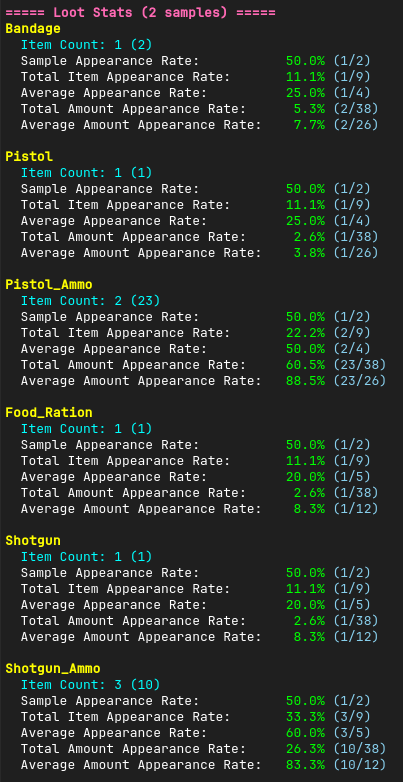
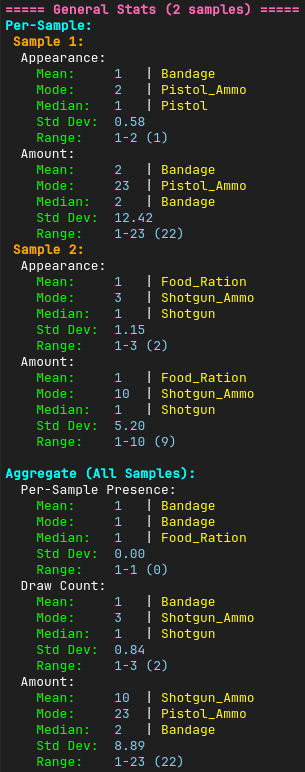
Candy Loot has you covered: a testing script is included, which can sample any table you designed. It simulates as many samples as you want, and it displays detailed numbers and stats so you can see the average outcomes very clearly, all from inside the Godot editor, without having to run your game!
It even offers an option to export the data to CSV files, so you can share the results with colleagues or import them to your favorite spreadsheet software. It includes various export options, including the ability to append new results to previous files in case you need to expand your sample size.
Performance
We’ve worked hard to optimize the algorithm and make it as fast and powerful as possible.
It’s hard to measure precise benchmarks since there’s many ways tables can be configured, not to mention varying hardware capabilities. But to provide a baseline, our testing on an older, low-end CPU showed the algorithm was capable of making ~200 000 to 500 000 draws per second even in tables that feature millions of potential drops.
The actual performance might even be much higher on a modern CPU, or when the algorithm isn’t running through our testing tool. In any case, that’s a huge number for any loot generation scenario — probably overkill.
And if you do need to work with such large numbers of rolls, you can hide any latency by performing rolls slightly ahead of time in the background — e.g. as soon as the player enters an area rather than when the results are actually needed.
To put it in less technical terms: it’s lightning-fast.
Pricing
Indie licenses:
• Candy Loot costs €10 only.
• This includes all Indie license tiers (Free, Starter and Pro), and no additional payment is required when upgrading tiers.
• Indie Licenses are valid for one individual. They last a lifetime and can be used by the same license holder for unlimited projects without additional payment.
• Indie licenses are a special offer to support small projects, priced considerably below the value our assets provide. See the Indie Project Checklist to determine if your project qualifies.
Studio licenses:
• Candy Loot is a Minor Asset. Studio projects can use our Minor Assets freely as long as they pay a minimum royalty rate of 1%.
• To clarify: Studio projects that already pay 1% or more for the use of other Major or Minor Assets don’t have to pay additional royalties.
• Studio Licenses apply per project and have no seat, budget or revenue limits. Royalties are calculated on gross revenue. Studio projects that earn 0 pay 0.
Features are identical across all licenses.
See our Licensing page for more details.
Compatibility
Godot:
Candy Loot is compatible with Godot Engine 4.
• It’s officially supported for Godot 4.4+.
• Godot 4.2 and 4.3 are not officially supported but appear to be fully compatible.
• Godot 4.0 and 4.1 are not officially supported, but a modified version of Candy Loot is provided.
• Candy Tools features only work in Godot 4.3+.
Operating System & Hardware:
Dependent on Godot: hardware and operating systems that can run Godot can run Candy Loot.