
Reset 3D Cursor
Reset 3D Cursor is an add-on for Blender.
It allows you to reset the 3D cursor at anytime in two clicks.
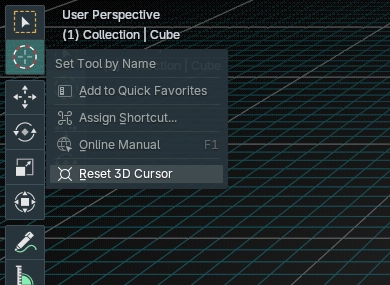
Usage
To reset the 3D cursor, just right-click the “Cursor” tool in the tool list, then select “Reset 3D Cursror”.
No keyboard shortcuts to remember, no extra features you don’t need, just a simple and intuitive solution to a common problem.
Licensing
Reset 3D Cursor is published under the GPLv3.
Compatibility
Reset 3D Cursor is compatible with Blender 4 and Blender 5.
It was tested with Blender 4.5 LTS and Blender 5.2.