
Window Resizer
Window Resizer is an add-on for Blender, for Linux with X11 or XWayland.
It automatically adjusts Blender windows at startup, to match any desired custom size and position.
It’s especially useful for multi-monitor setups where users want some windows to span across two or more monitors.
Features
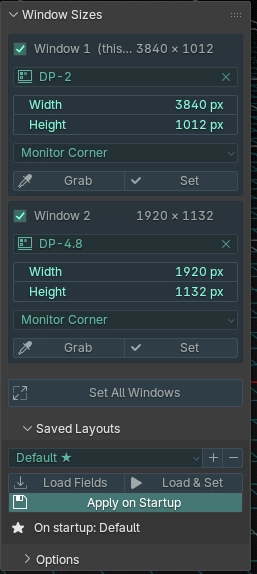
Window Resizer adds a tab to the N-Panel, where Blender windows can be configured.
You can select which monitor a window should belong to and the desired size of each window.
You can also specify the position of each window, either relative to its monitor or as an absolute value of your desktop space.
The option to save multiple window presets is provided, and one such preset can be designated to automatically apply at Blender startup.
Note: without getting too technical, due to system limitations, using code to reliably make windows expand across multiple monitors is not possible.
Instead, Window Resizer briefly takes control of the mouse to do so. This may be considered a ‘dirty’ solution, but it works (and as far as we know, it’s the only option).
Users are advised not to use the mouse or any inputs while Window Resizer is adjusting windows. Nothing should break if that happens, but windows may fail to resize or reposition properly.
Licensing
Window Resizer is published under the GPLv3.
Compatibility
Blender
Window Resizer should work across Blender 4 and Blender 5.
It was tested on Blender 5.2 and Blender 4.5 LTS.
System
Window Resizer works on Linux running an X11 session (Xorg, or XWayland under a Wayland compositor) with an EWMH-compliant Window Manager — GNOME, KDE, XFCE, i3, and most others.
It does not work if Blender is running as a native Wayland client.
It is not compatible with Windows or MacOS, or other operating systems.