
 Copyright © 2025-2026 Candy Arts
Branching
In this tutorial, you will learn to make a Dialogue say different things depending on your game's state, with the If, Elif and Else commands. In the evening scene, John's last words depend on how many coffees he drank during the day.
You will also learn three Transition Commands that work together: Bridge, LM and Return. With them, every possible result of the If chain is written in a single Block.
Before You Start
This tutorial continues the Dialogue of the Conversations tutorial. It must be open in Candy Dialogue Creator: if you saved it (File > Save) and closed Candy Dialogue Creator since, open it again with File > Load Dialogue...
1. Adding a Flag
A flag records something that happened in your game, so that Dialogues can react to it. Flags are stored in the flags dictionary of Flags.gd: each key is a flag's name, and its value is the flag's value when the game starts.
1. In the Godot Editor, open the Candy Dialogue tab of the bottom panel. Choose Data in the drop-down at the top of the panel, then click Flags: Flags.gd opens in the script editor.
2. Add a coffees flag inside the flags dictionary, with the value 1:
var flags = {
	...
	"coffees": 1,
}coffees flag is the number of coffees John drank during the day. In a game, your code or your Dialogues would change it as the day goes by. Here, you change its value in Flags.gd to test each result.
2. Writing the Results
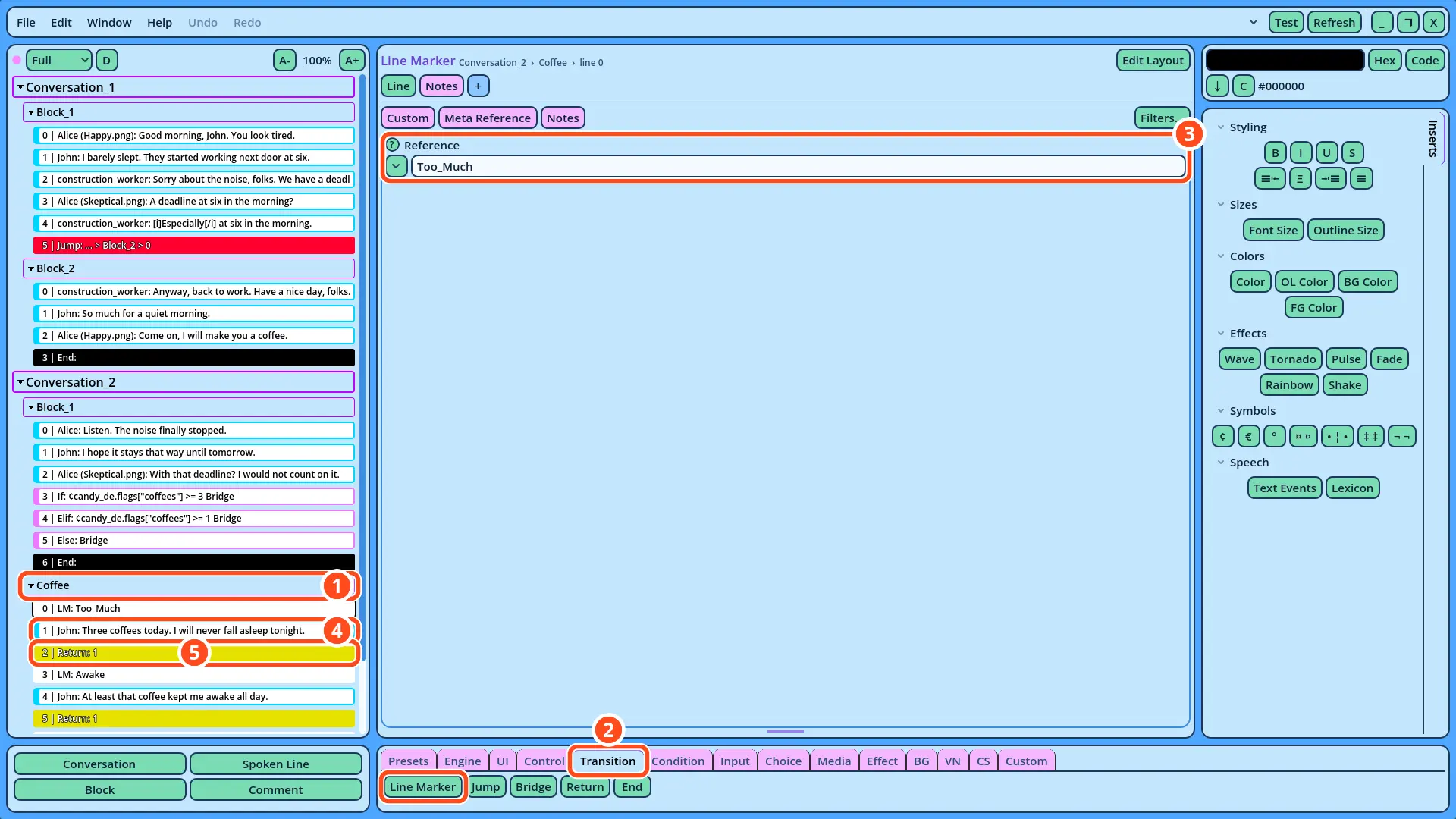
The If chain has three possible results: John drank too many coffees, John drank some coffee, or John drank none. The three results are written in one Block, Coffee, one after the other. Each result starts with an LM command and ends with a Return command.
1. Add a Block to Conversation_2, named "Coffee", as in the Connecting Blocks tutorial.
2. With Coffee selected, open the Transition tab of the Buttons panel and click Line Marker. An LM command is added to Coffee.
3. In its Reference field, write "Too_Much".
4. Add a Spoken Line: John, with no portrait, saying "Three coffees today. I will never fall asleep tonight."
5. In the Transition tab, click Return. Leave its Levels field at 1.
| LM Reference | Speaker | Portrait | Text |
| Awake | John | (empty) | At least that coffee kept me awake all day. |
| No_Coffee | John | (empty) | By the way, I never got that coffee. |
| Alice | Sad.png | Sorry. Tomorrow, I promise. |
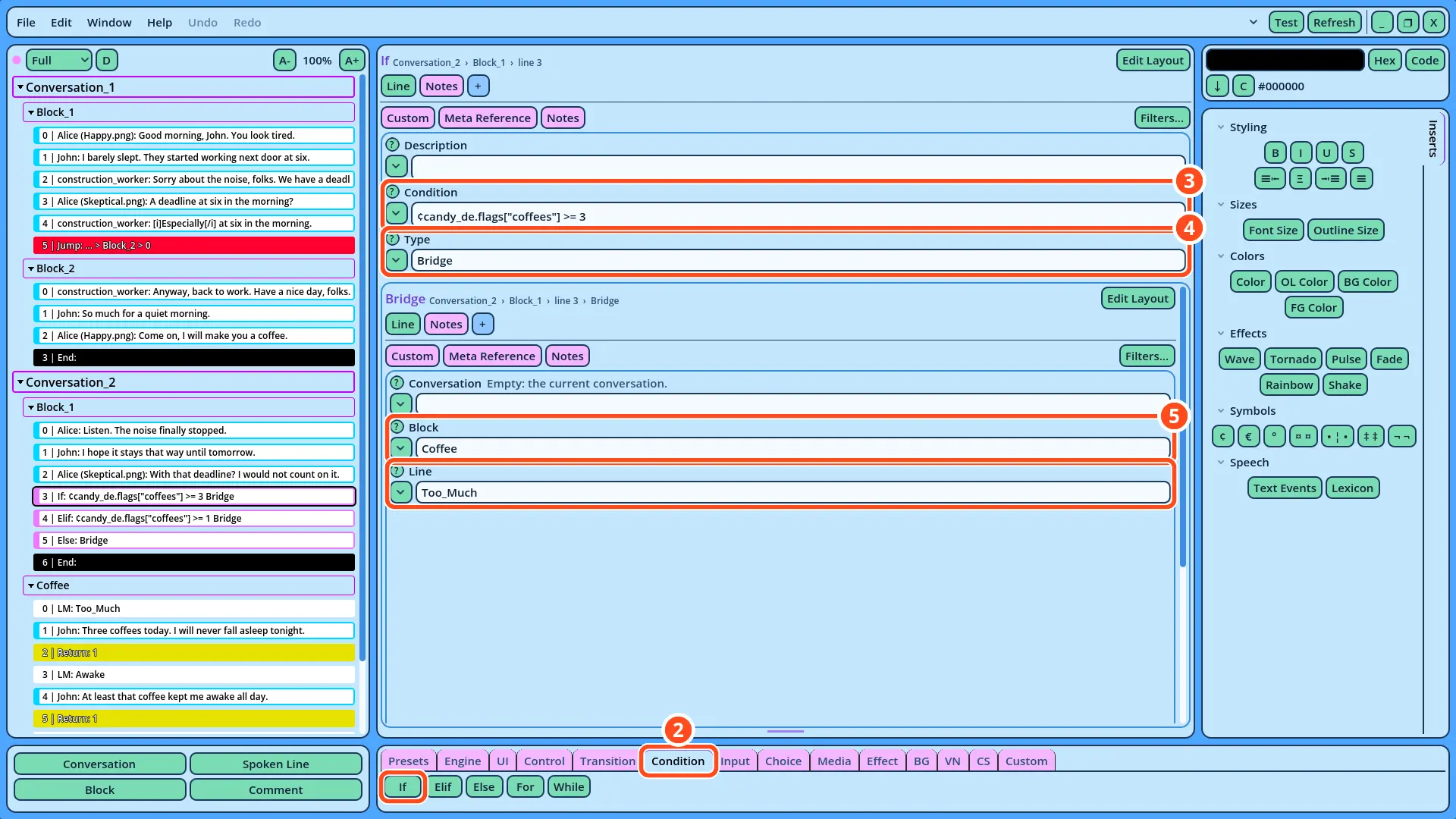
¢candy_de.flags["coffees"] >= 3
4. In the Type field, click the v button and select Bridge, in the Transitions category. The fields of a Bridge command are displayed under the If's fields.
5. In the Bridge's Block field, write "Coffee". In its Line field, write "Too_Much", or click the field's v button and select it.
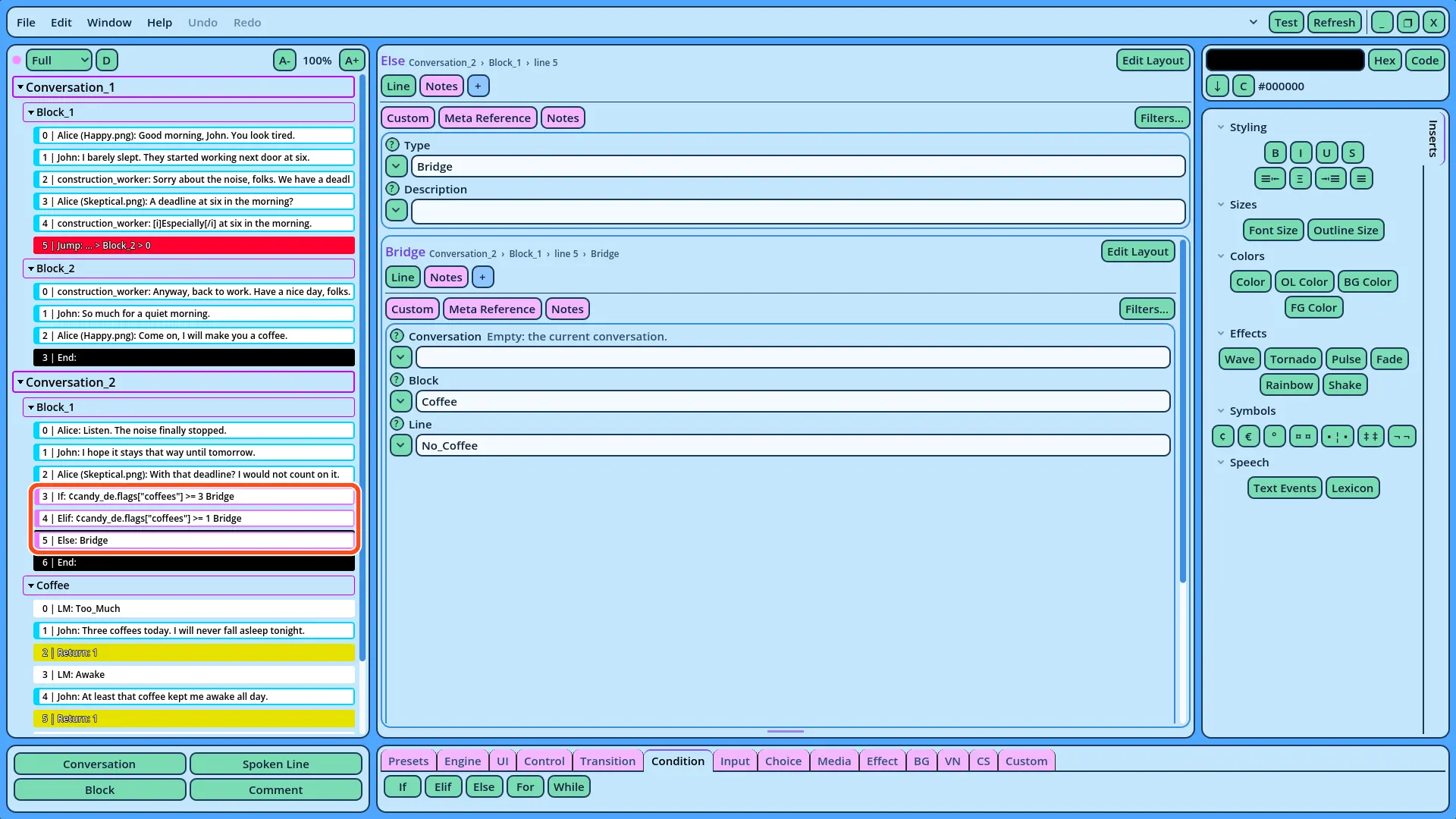
¢candy_de.flags["coffees"] >= 1, select Bridge in Type, and write "Coffee" in Block and "Awake" in Line.
7. With the Elif selected, click Else. Else has no Condition: select Bridge in Type, and write "Coffee" in Block and "No_Coffee" in Line.
candy_de.flags["coffees"] reads the coffees key of the flags dictionary, and >= 3 compares it with 3. The ¢ symbol can be inserted with its button, in the Symbols section of the Inserts panel.
The If, Elif and Else commands form an If chain, tested from top to bottom. The first one whose Condition is true runs its command, and the rest of the chain is skipped. Else runs its command when no Condition of the chain is true. The commands of a chain must follow each other, with no other Line between them.
Each command of the chain runs a single command, chosen in its Type field: here, a Bridge. A Bridge continues the Dialogue in another Block, like a Jump, but returns once that Block ends, or once a Return command is reached. The Dialogue then continues after the If chain, with the End command.
The Bridge's Line field designates the LM command of the result, by its Reference. A Line can also be designated by its number, but the numbers of the Lines after it change when a Line is added or removed before them. A Reference moves with its LM command, so it designates the same place however the Block changes.
This is why the three results can share one Block. Each Bridge starts at the LM of its result, and each result ends with a Return, so the Dialogue never continues into the next result.
4. Testing the Results
1. Right-click Conversation_2 in the Dialogue Navigator, and select Test Here.
With coffees at 1, the first Condition is false and the second is true: after Alice's last Line, John says "At least that coffee kept me awake all day.", and the Dialogue ends.
2. In Flags.gd, change the value of coffees to 3, save the script, and test again. John says "Three coffees today. I will never fall asleep tonight."
3. Change the value to 0, save, and test again. Both Conditions are false, so Else runs: John says he never got that coffee, and Alice apologizes.
If the Test Fails
• The Dialogue ends after Alice's last Line: check that the If chain is between Alice's last Line and the End command, and that each command of the chain has Bridge in its Type field.
• The Dialogue continues into the next result: check that each result ends with a Return command.
• The Output panel of the Godot Editor reports an error about a Condition: check that the Condition starts with ¢, and that the flag's name is written exactly as in Flags.gd.
• The same result plays whatever the flag's value: save Flags.gd before each test.
All the results of the If chain are now in the Coffee Block. More results can be added the same way: an LM, the Lines, and a Return.