Candy Logo Copyright © 2025-2026 Candy Arts

Pausing Media
In this tutorial, you will learn to pause a sound and to resume it, with the Media_Pause and Media_Resume commands. Birds sing in the garden, go quiet while the construction worker drills, and sing again once she's done. Before You Start This tutorial uses the Actors and portraits of the Beginner tutorials: Alice, John and the construction worker. Write its scene in the Dialogue of your choice: the Dialogue of the Beginner tutorials, or a new one (File > New Dialogue). 1. The Sound File Sounds are played by audio players. The dialogue UI provided with Candy Dialogue Engine contains several of them, and this tutorial uses the one named Ambient, for background sounds: the AmbientPlayer node of the dialogue UI scene. Each player plays the files of a folder named after it: the Ambient player's files are in Candy_DE/Media/General/Audio/Ambient. The birdsong, Birds.ogg, is already in that folder: it's part of the Media folder copied in the Dialogue tutorial. It lasts twenty seconds, and loops without a gap. 2. Writing the Scene 1. Add a Conversation named "Garden", as in the Conversations tutorial. 2. In its Block_1, add five Spoken Lines, then an End command after the last one:
SpeakerPortraitText
AliceHappy.pngListen to the birds. What a peaceful morning.
construction_worker(empty)Morning, folks! Time to start the drill.
John(empty)Even the birds went quiet.
construction_worker(empty)Done. Enjoy your morning.
AliceHappy.pngListen. They are singing again.
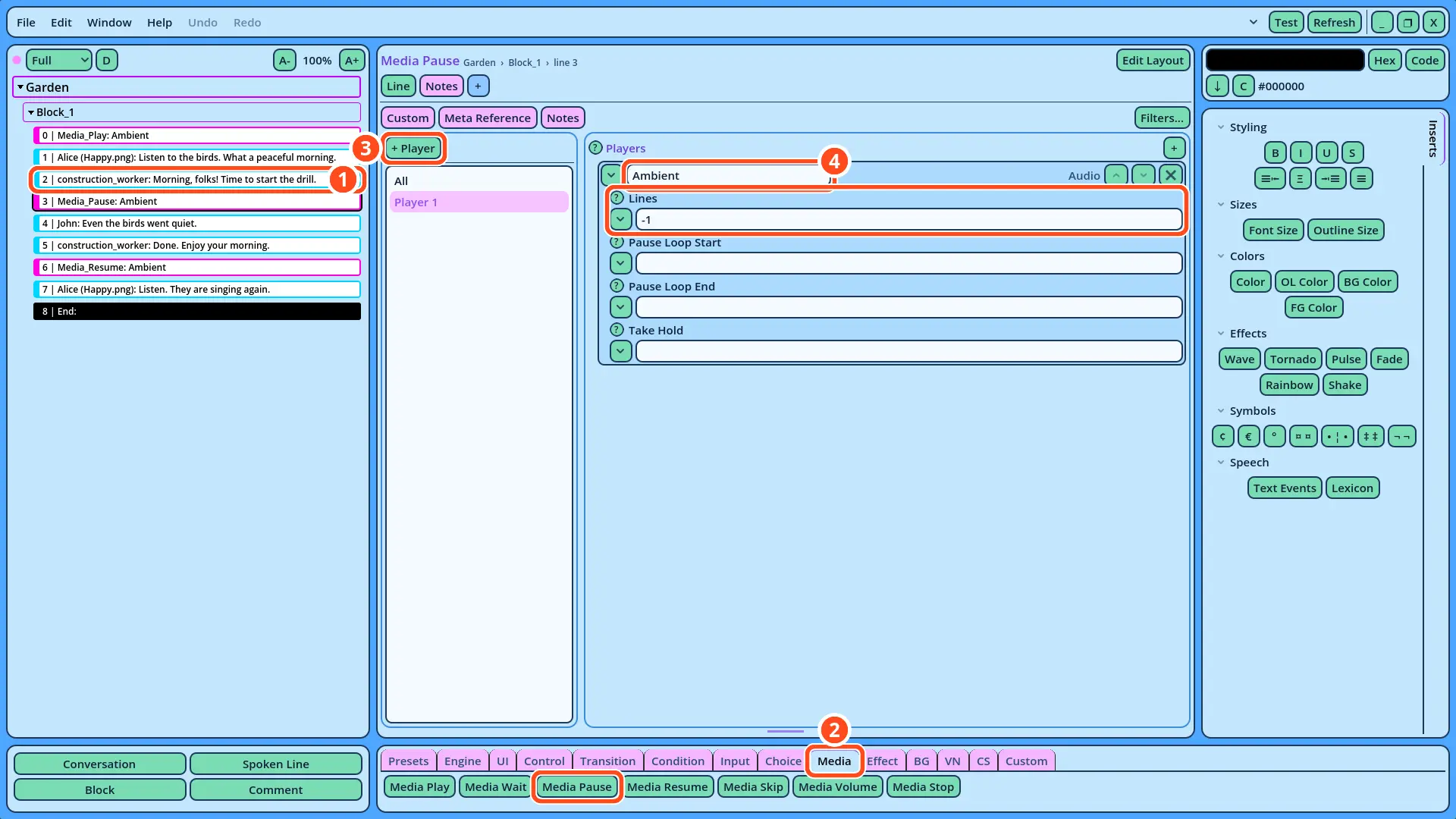
The birdsong starts before the first Line, with a Media_Play command. A new command is added after the selected Line: to add one at the very start of the Block, add it after the first Line, then drag it above that Line in the Dialogue Navigator. To play the birdsong: 1. Select Alice's first Line, "Listen to the birds. What a peaceful morning." 2. Open the Media tab of the Buttons panel, and click Media Play. 3. In the Field Tree, on the left of the form, click + Player. 4. In the name field, at the top of Player 1's fields, replace "Player_1" with "Ambient", or click the field's v button and select Ambient in the list. 5. Click the v button of the File field, and select Birds.ogg. 6. In the Loops field, write "-1", or click the field's v button and select Loop forever. 7. Drag the Media_Play command above Alice's first Line, in the Dialogue Navigator. With Loops at -1, the birdsong loops until it's stopped, paused, or the Dialogue ends. 3. Pausing the Sound 1. Select the construction worker's Line "Morning, folks! Time to start the drill." 2. In the Media tab of the Buttons panel, click Media Pause. The Media_Pause command is added after the construction worker's Line. 3. In the Field Tree, click + Player. 4. In the name field, replace "Player_1" with "Ambient", or select Ambient in the list of the field's v button.
Tutorial Media Pause
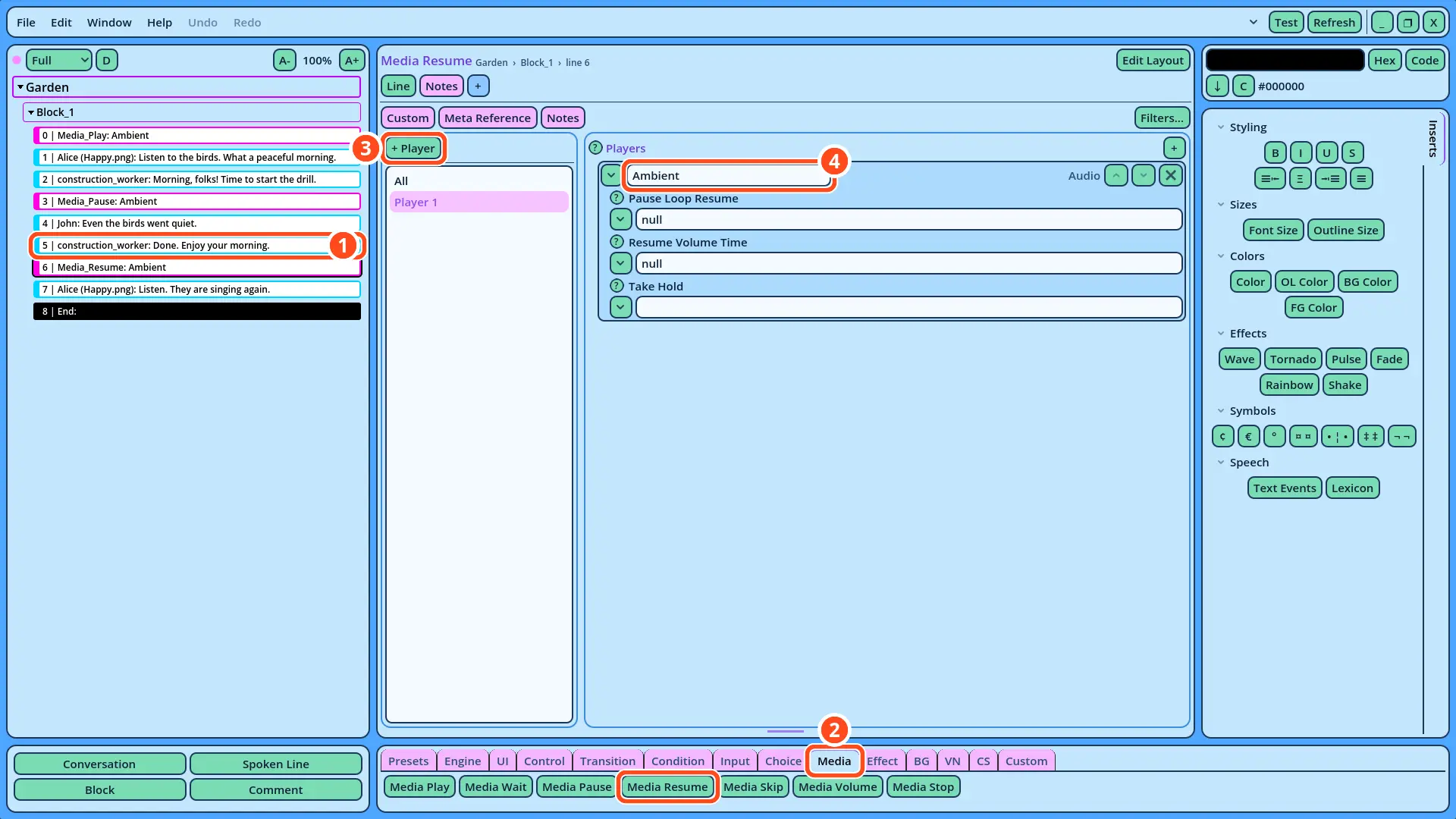
Leave the other fields at their default value. With Lines at -1, the sound remains paused until a Media_Resume command resumes it. 4. Resuming the Sound 1. Select the construction worker's Line "Done. Enjoy your morning." 2. In the Media tab of the Buttons panel, click Media Resume. 3. In the Field Tree, click + Player. 4. In the name field, replace "Player_1" with "Ambient", or select Ambient in the list of the field's v button.
Tutorial Media Resume
How Pausing Works The Media_Pause command stops the sound where it is, and the Media_Resume command continues it from that point: the birdsong doesn't start over. The Lines field of the Media_Pause command can also resume the sound by itself, after a number of Lines. With Lines at 2, the birdsong would resume once John's Line and the construction worker's "Done." have been displayed, without a Media_Resume command. 5. Testing the Scene 1. Right-click Garden in the Dialogue Navigator, and select Test Here. 2. The birds sing during Alice's first Line, and go quiet as soon as you advance past the construction worker's first Line. 3. Advance past "Done. Enjoy your morning.": the birds sing again. If the Test Fails • No sound is played: check that Birds.ogg is in the Ambient folder, that the Godot Editor imported it, and that the Media_Play command comes before Alice's first Line. • The birds never go quiet, or never come back: check that the player of the Media_Pause and Media_Resume commands is named Ambient, as in the Media_Play command. • The name field displays "Unknown type" instead of "Audio": Candy Dialogue Creator didn't find the Ambient folder. Check that Candy_DE/Media/General/Audio/Ambient exists, then click Refresh. The garden now reacts to the scene: a sound can stop for a moment and pick up where it left off.