Candy Logo Copyright © 2025-2026 Candy Arts

Dispositions
In this tutorial, you will learn to make Spoken Lines play only when their speaker is in a given disposition, and to change an Actor's disposition with the Disposition command. Alice greets John according to her mood, and when John criticizes her coffee, her mood changes and so does her answer. A disposition is a word that describes an Actor's current state: a mood ("Calm", "Offended"), a relationship ("Friend", "Rival"), a need ("Hungry")... The words are chosen freely: they only have to match where they're compared. Before You Start This tutorial uses the Actors and portraits of the Beginner tutorials: Alice, John and the construction worker. Write its scene in the Dialogue of your choice: the Dialogue of the Beginner tutorials, or a new one (File > New Dialogue). 1. Giving Alice a Disposition An Actor's disposition is written in the Disposition property of their entry in the actors dictionary. Alice starts calm. 1. In the Godot Editor, open Actors.gd: in the Candy Dialogue tab of the bottom panel, choose Data in the drop-down, then click Actors. 2. Add a Disposition property to Alice's entry, with the value "Calm", and save the script:
"Alice": { "DisplayName": "Alice", "Disposition": "Calm", },
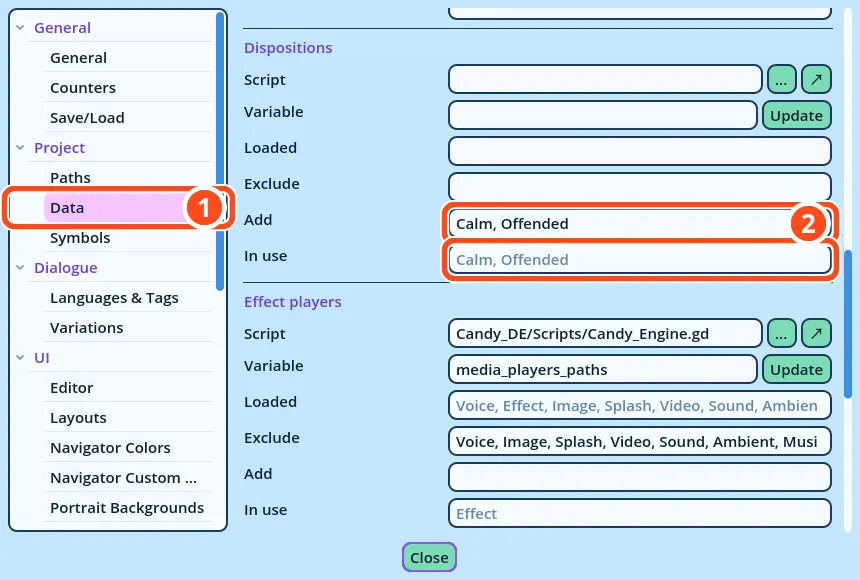
Dispositions are case-sensitive: "Calm" and "calm" are different dispositions. 2. Adding the Dispositions to Candy Dialogue Creator Candy Dialogue Creator lists the dispositions of your project in its settings, to include them in drop-down lists, and to check the dispositions written in Lines. 1. Open Edit > Settings..., then the Data page of the Project category. 2. In the Dispositions section, replace the text of the Add field with "Calm, Offended", and press Enter. The two dispositions appear in the "In use" field. Close the settings.
Tutorial Dispositions Settings
3. Writing the Scene Alice has two Lines at each turn of the conversation: one for each disposition. 1. Add a Conversation named "Mood", as in the Conversations tutorial. 2. In its Block_1, add five Spoken Lines, then an End command after the last one:
SpeakerPortraitTextDisposition
Alice(empty)Good morning, John. Did you sleep well?Calm
AliceSkeptical.pngOh. It is you.Offended
John(empty)Not really. And your coffee yesterday was terrible.(empty)
AliceHappy.pngLet me make you a better one.Calm
AliceSkeptical.pngThen make your own coffee.Offended
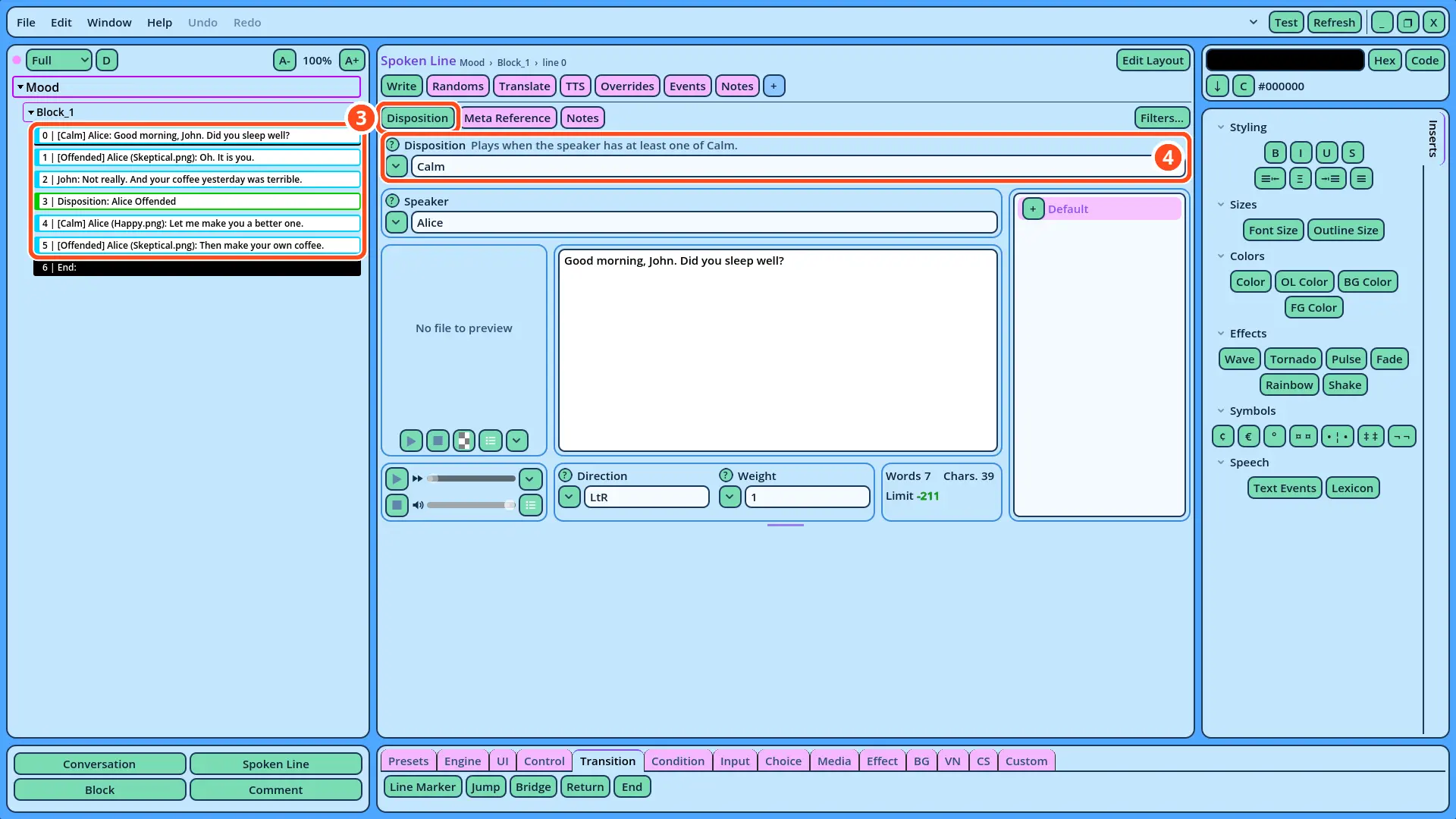
To write a Line's disposition, select the Line, then: 3. If the Disposition field isn't displayed above the Speaker field, click Disposition, in the row of buttons above it. The button shows or hides the field. 4. In the Disposition field, write the Line's disposition, or click the field's v button and select it in the list.
Tutorial Dispositions Line
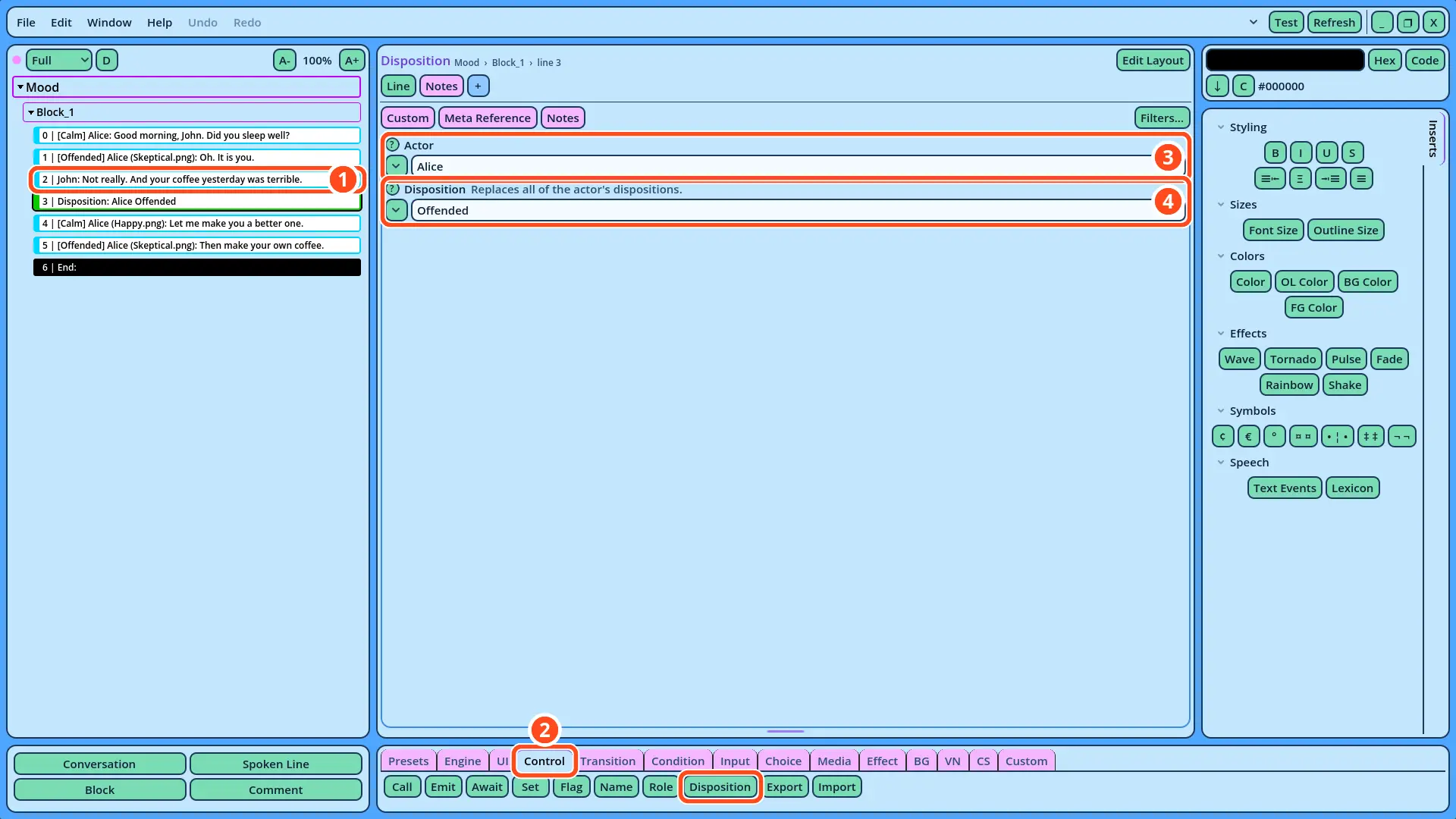
How Line Dispositions Work A Spoken Line with a disposition plays only when its speaker has that disposition: the other Lines are skipped. Of each pair of Alice's Lines, only the one that matches her current disposition is displayed. A Line with an empty Disposition field, like John's, always plays. The Dialogue Navigator displays each Line's disposition between brackets, before the speaker: "[Calm] Alice: Good morning, John. Did you sleep well?" 4. Changing Alice's Disposition John's remark about her coffee offends Alice. 1. Select John's Line "Not really. And your coffee yesterday was terrible." 2. Open the Control tab of the Buttons panel, and click Disposition. The Disposition command is added after John's Line. 3. In the Actor field, write "Alice", or click the field's v button and select her in the list. 4. In the Disposition field, write "Offended", or select it in the list of the field's v button.
Tutorial Dispositions Command
How the Disposition Command Works The Disposition command replaces the disposition of the Actor written in the Actor field. The Lines that follow it are compared with the new disposition: after John's remark, Alice is "Offended", and only her Line "Then make your own coffee." plays. The disposition is changed while the game runs: Actors.gd itself isn't modified, and Alice is "Calm" again when the game starts. 5. Testing the Dispositions 1. Right-click Mood in the Dialogue Navigator, and select Test Here. 2. Advance through the scene. Alice says "Good morning, John. Did you sleep well?", since she's calm. After John's remark, she says "Then make your own coffee.": the Disposition command made her offended. 3. In Actors.gd, change Alice's Disposition to "Offended", save the script, and test again. Alice now greets John with "Oh. It is you." 4. Change Alice's Disposition back to "Calm", and save the script. If the Test Fails • Alice doesn't greet John: neither of her first two Lines matched her disposition. Check that the dispositions are written the same way, with the same capital letters, in Actors.gd and in the Lines, and that Actors.gd is saved. • Alice says both Lines of a pair: a Line with an empty Disposition field always plays. Check the Disposition field of each of Alice's Lines. • Alice answers "Let me make you a better one.": check the Disposition command: it must come after John's Line, with the Actor "Alice" and the Disposition "Offended". • Candy Dialogue Creator displays "No disposition … in the project's data." above a Disposition field: add the disposition to the Add field of the Data settings (step 2). Alice's mood now decides what she says: the same Block holds her Lines for every mood, and her disposition decides which ones play.