

Importing
Importing merges the Conversations and Blocks of a Dialogue file into the open Dialogue. It serves to edit a Dialogue only available as an exported file, to merge someone else's work into yours, or to copy a few Conversations from another Dialogue.
Choose File > Import Dialogue... (Ctrl+I).
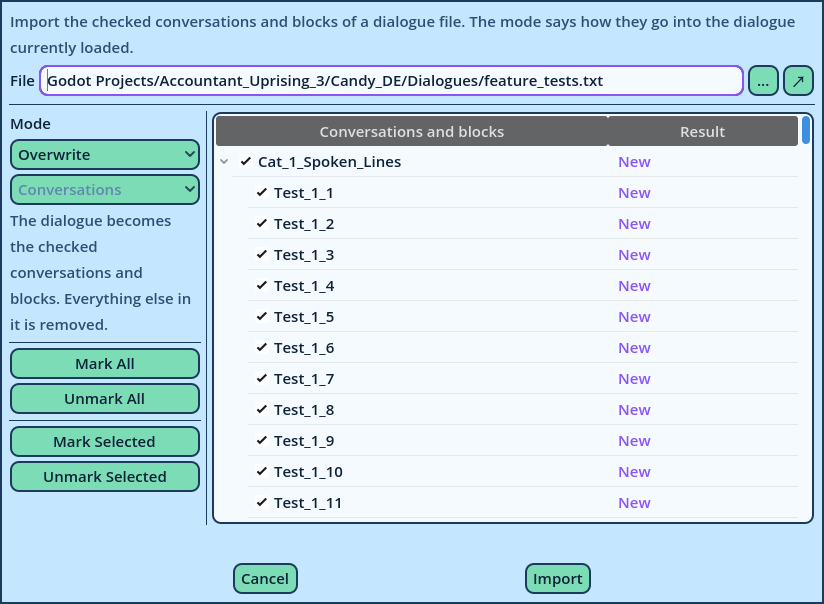
| Mode | What changes in the open Dialogue |
| Overwrite | The Dialogue becomes what is checked. Everything else in it is removed. |
| Add | Only what the Dialogue doesn't contain yet is added. What it contains remains as it is. |
| Update | Only what the Dialogue already contains is replaced. Nothing is added. |
| Add & Update | Everything checked is written. |
- Importing can't be undone: the undo history is cleared. Save the Dialogue before importing.
- Overwrite replaces the whole Dialogue. Changes that weren't saved are lost, and the Dialogue is no longer the save that was open: the next Save asks for a file.
- A file made for Candy Dialogue Engine 1.1 isn't imported: convert it first (see Converting 1.1 Files).
- The names of the imported Variations are checked. Names Candy Dialogue Creator can repair are repaired, and a report lists them. If some can't be repaired, nothing is imported (see Variations).
- Conversations named like the preset Conversations are left out.
- A file written with other symbols than the profile's is updated first, after asking, and so is the open Dialogue when the profile's symbols changed since it opened (see Updating Symbols).