

Candy Logo

Users and Profiles
Candy Dialogue Creator opens on the landing screen, where you choose who is working and on which project.
  • A user is a person: a writer, a translator, a developer. Each user has their own project profiles.
  • A project profile is one game project of that user. It contains everything about that project: its settings, its window layout, its saves and its presets.
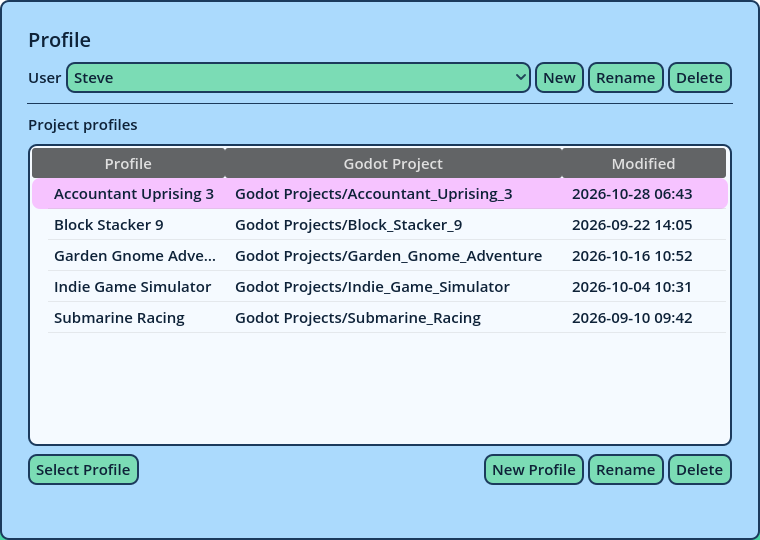
You always work inside a project profile. To write Dialogues for two games, create a profile for each.
Landing Screen
The Profile Card Users The User dropdown selects the user. Beside it:
  • New creates a user.
  • Rename renames the selected user.
  • Delete deletes the selected user, with all of their project profiles and saves. This can't be undone.
Project Profiles The Project profiles list displays the selected user's profiles, with the Godot project each one is connected to and the date it was last modified.
  • New Profile creates a profile for the selected user.
  • Rename renames the selected profile.
  • Delete deletes the selected profile, with its settings and saves. This can't be undone.
  • Select Profile opens the selected profile. Double-clicking a profile does the same.
A new profile starts with the default settings, the default window layout and an empty Dialogue. The first step in a new profile is to connect it to your Godot project: see Project Setup. Opening and Closing a Profile A profile always opens on a new, empty Dialogue. To continue your work, load a save with File > Load Dialogue... (see Saving and Loading). The Presets are loaded as the profile opens. A preset file written with other symbols than the profile's is left out until it is updated: Candy Dialogue Creator asks to update it (see Updating Symbols). To return to the landing screen, choose File > Switch Profile.... The profile's settings and window layout are saved when it closes. The Dialogue is not: save it first. User and Project Levels Most data is stored at one of two levels, and Candy Dialogue Creator asks which one when it matters:
User levelProject level
Available inEvery profile of the userOne profile
Settings All settings, the window layout, shortcuts and theme
Saves Manual, auto and quick saves
PresetsUser presetsProfile presets
InsertsUser insertsProfile inserts
Saved layoutsUser layoutsProject layouts
Store at the user level what is shared by all your projects, such as your preferred window layout or the inserts you always use, and at the project level what only applies to one game. The News Card Below the profile card, the News card displays news from Candy Arts, one item at a time. Previous and Next step through them.
  • Refresh downloads the news now.
  • Auto downloads the news every time Candy Dialogue Creator starts.
Links in the news open in your web browser.