

Testing
The Test button, on the right of the top bar, runs the Dialogue in your game in one click: Candy Dialogue Creator exports it, then the Godot editor runs it in a testing scene.
Requirements
- The project root set in Settings > Project > Paths.
- Your project open in the Godot editor.
- Candy Wizard, Candy Dialogue Engine's plugin, enabled in that editor.
- The whole Dialogue is exported to test_dialogue.txt in your project's Dialogues folder, without asking. This file is only for testing: every test replaces it.
- The Godot editor then runs the testing scene on it.
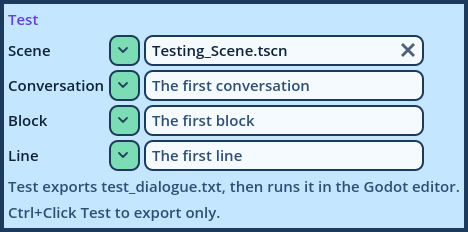
| Field | Description |
| Scene | The testing scene to run, from the Testing scenes folder set in Settings > Project > Paths. Empty: the scene chosen in Candy Wizard's Test tool. |
| Conversation | The Conversation to start in. Empty: the Dialogue's first. |
| Block | The Block to start in. Empty: the Conversation's first. |
| Line | The Line to start at: its number, or the Reference of a Line Mark. Empty: the first Line. |
dialogue, conversation, block and line, as Candy Dialogue Engine's Testing_Scene.gd does.
Test Here
To test from a precise place without changing the menu, right-click a row in the Dialogue Navigator and choose Test Here, or select it and press Shift+F6.
- On a Line, the test starts at that Line.
- On a Block or a Conversation, it starts at its first Line.
| Message | What to do |
| Set the project root first | Set Project root in Settings > Project > Paths. |
| The project has no data folder yet | Open the project in the Godot editor once. |
| The Godot editor didn't answer | Open the project in the Godot editor, and enable Candy Wizard in its plugins. |
| Candy Wizard couldn't test it | Candy Wizard checked the scene and the starting point against the exported file and found a problem, which the message reports: a scene that doesn't exist, a Conversation, Block or Line that isn't in the Dialogue... |