

Portrait Preview
The Portrait Preview displays the portrait of a Spoken Line: the file named in its Portrait field, from the folder of its Speaker. A Line has one portrait for all its Variations.
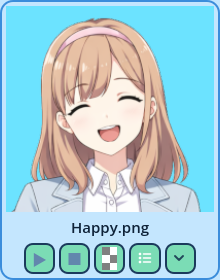
- The project root and the Portraits folder set in Settings > Project > Paths.
- A Speaker that is an Actor. The portrait of a Role, or of a speaker set by an expression, is only known in the game.
- A Portrait written with its file extension, as the dropdown writes it.
- Play Portrait: how many times the animation plays.
- Portrait Stop: the frame it stops on.
| Button | What it does |
| Play | Plays or pauses the portrait. Once it has ended, plays it again. |
| Stop | Stops, back to the first frame. |
| Color | Picks the background color. |
| Portrait fields | Opens a pop-up with the Line's portrait fields: Portrait, Sprite Frames File, Play Portrait, Portrait Stop, and the portrait overrides, such as Portrait Mode. |
| The arrow | Opens the Portrait field's dropdown, to pick the portrait file. As in the field, hovering a file plays it beside the mouse pointer, and picking an animation also fills Sprite Frames File. |
- The widget has a background color and a background texture of its own. A texture is displayed in preference to a color.
- An Actor or a Role can have a background of their own, set in Settings > UI > Portrait Backgrounds. It's displayed instead of the widget's, in every Portrait Preview. See Portrait Backgrounds.
| Option | Description |
| Background color | Displayed behind the portrait when there is no background texture. |
| Background texture | An image on your disk, displayed behind the portrait instead of the color. |
| Play animated portraits while the mouse is over them | On, an animated portrait displays its first frame until the mouse is over it. Off, it plays as in the game. |
| Buttons | The position of the buttons: Hidden, in a row above or below the portrait, or in a column on its left or right. |
| Button order | The order of the buttons. Drag them in the list to reorder them. |
| File name | Displays the name of the portrait's file above or below the portrait, or hides it. Its tooltip displays the whole path. When no file is found, the Portrait field's value is displayed instead. |
| Minimum Size, Maximum Size | The minimum and maximum size of the widget's area. |