

Translating
In Candy Dialogue Engine, a translation is written in the Line itself: each language is a Variation of the Spoken Line's text. Translating a Dialogue means writing those Variations.
This page is for translators, and for writers who prepare a Dialogue for them.
Before You Start
- The language you translate to must exist in the profile: add it in Settings > Dialogue > Languages & Tags (see Variations).
- Load the Dialogue to translate: a save with File > Load Dialogue..., or an exported file with File > Import Dialogue....
- In Settings > Dialogue > Languages & Tags, hide the languages you don't work with, so that the lists stay short.
- The text in the language you translate from, to read.
- A text box for the language you translate to, to write in.
- Counters that compare the two.
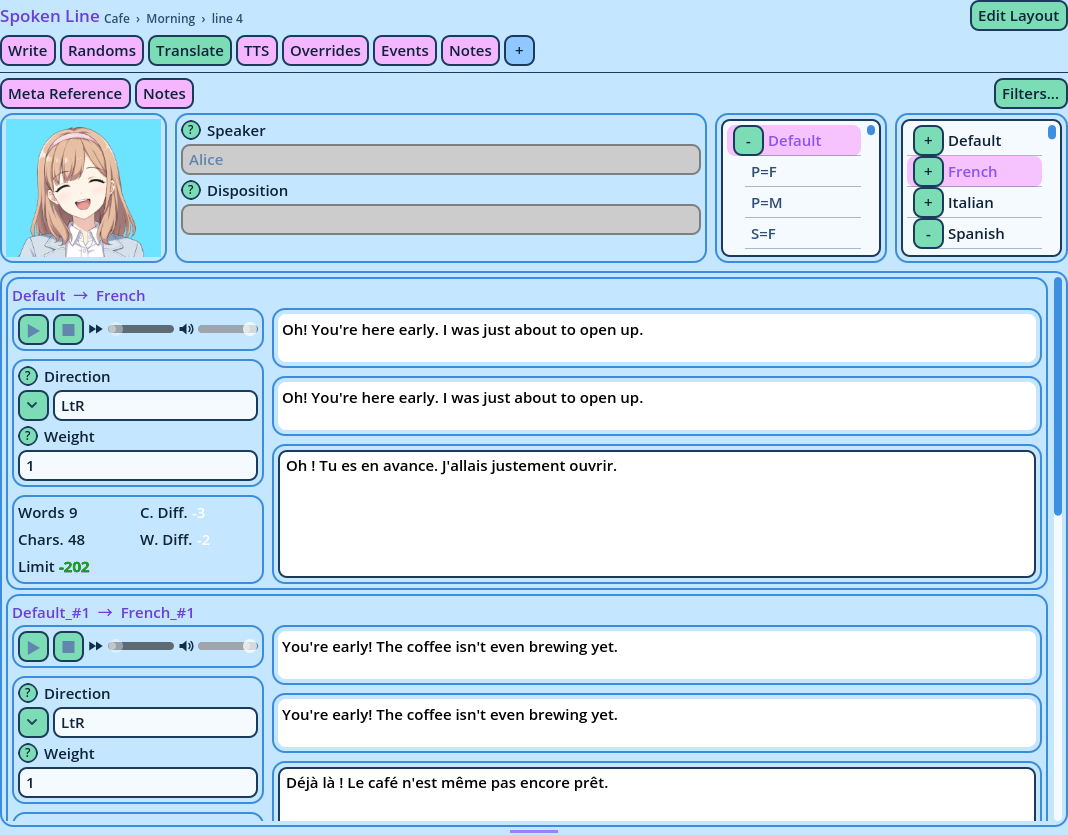
| Counter | Description |
| Words, Chars. | The words and characters of the translation. BBCode tags aren't counted. |
| Limit | How far the translation is from the character limit: -100 is 100 characters under it, +20 is 20 over. |
| C. Diff., W. Diff. | The translation's characters and words, compared with the original's: +12 is 12 more. |
- Alt+PageDown opens the next Line, and Alt+PageUp the previous one. The Editor stays on the Translate tab from one Spoken Line to the next.
- The languages picked in the selectors stay picked.
- Text direction. A Variation in a right-to-left language starts with the Right to left direction, when its language is declared with it.
- Voices. Each language has its own voice files, with the same file name. Nothing is entered in the Line for them.
- Names and interface texts. Actor names and the texts of the game's interface aren't translated in the Lines but in your game's tables. See the Candy Dialogue Engine documentation, under Translation.