

Data
Settings > Project > Data
The names your game defines in its scripts, which Lines refer to: Actors, Roles, Flags and so on. Candy Dialogue Creator reads them from your project, so that dropdowns list them and checks report a Line that names one that doesn't exist.
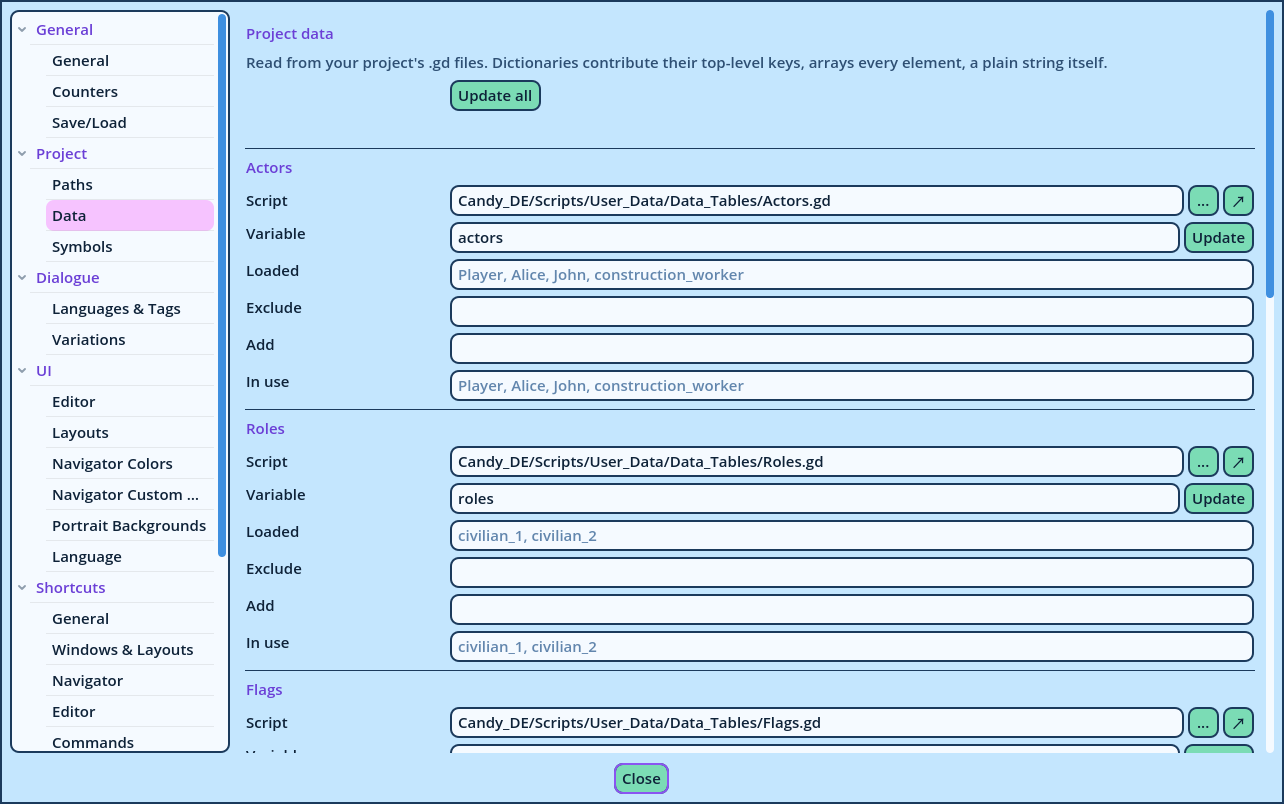
| Kind | Used for |
| Actors | The speaker of a Spoken Line, and every field that accepts an Actor. |
| Roles | The same fields: a Role stands in for an Actor chosen while the game runs. |
| Flags | The Flag command. |
| Dispositions | The Disposition of a Spoken Line, and the Disposition command. |
| Effect players | The Effect commands. |
| CS paths | The targets of the Cutscene commands. |
| Field | Description |
| Script | The .gd file that contains the data, in your project. |
| Variable | The name of the variable to read in that script. |
| Update | Reads the variable again. |
| Loaded | What the last update read. Not editable. |
| Exclude | Values to exclude from what was loaded, separated by commas. |
| Add | Values that aren't in the script, separated by commas. |
| In use | The result: what was loaded, minus the excluded values, plus the added ones. This is the list Candy Dialogue Creator reads from. |
- The keys of a dictionary. For the Actors, these are the Actor References.
- Every element of an array.
- A plain text, as it is.
| Field | Description |
| Lexicon script, Lexicon variable | The script containing the Lexicon keywords, and its dictionary: Lexicon.gd and lexicon in a standard install. |
| Text events script, Text events variable | The script containing the Text Events every Line can use, and its dictionary: Text_Events.gd and text_events in a standard install. |