

Text Event Editor
The Text Event Editor creates a Spoken Line's own Text Events. A Text Event runs Commands while the Line is written, when the writing reaches its marker in the text: in Wait‡boom‡... what was that?, the Event "boom" runs after "Wait". It can pause or speed up the writing, play a sound, change a variable, change the portrait, move a character...
A Line's own Events take precedence. Events shared by the whole project belong in its Text Events dictionary (Text_Events.gd), available to every Line. See Candy Dialogue Engine's documentation for Text Events.
To type a marker into the text, use the Text Events drop-down of the Inserts panel, or type it.
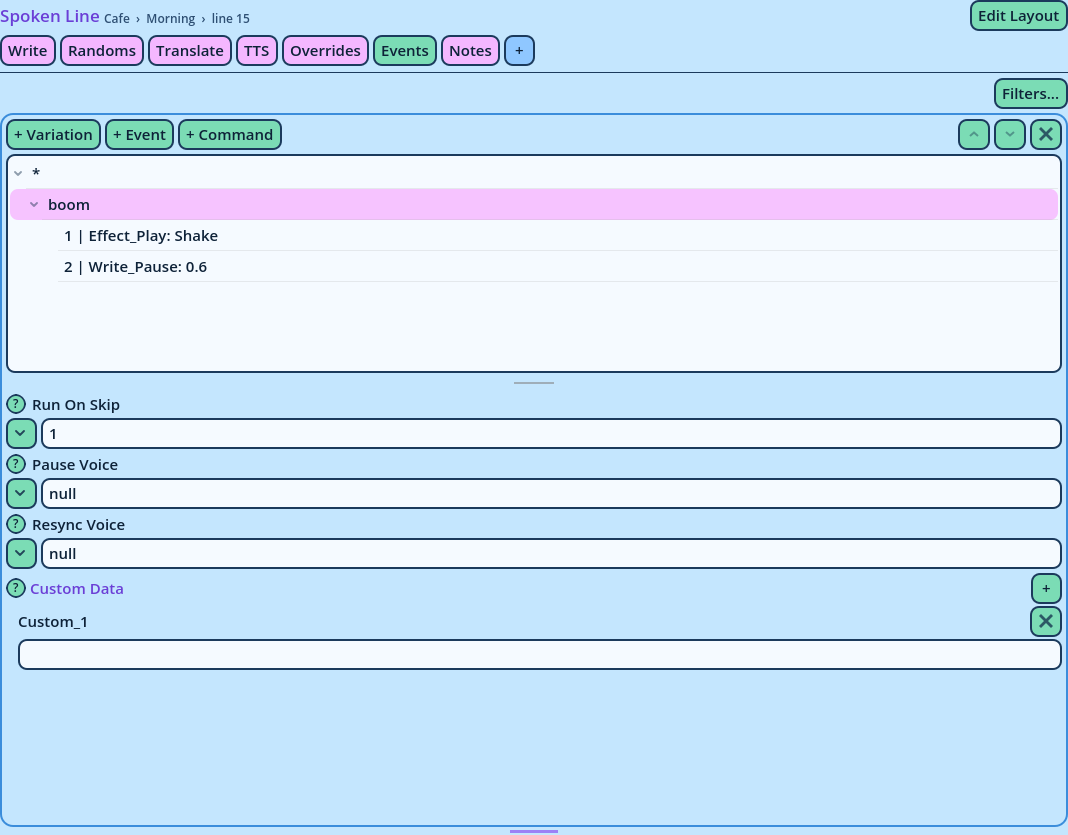
- Variation patterns: which Variations the Events under them are for.
*is every Variation,Default*every Variation whose name starts with Default, and a Variation's exact name only that one. When an Event is under several patterns that apply to a Variation, the most specific pattern wins. - Events: each named after its marker.
- Commands: what each Event runs, numbered, in the order they run.
- Drop it above or below another Command: it is placed there, in that Command's Event.
- Drop it on an Event: it is placed at the end of that Event's Commands, even an Event that has none yet.
| Button | Description |
| + Variation | Adds a Variation pattern, * at first, ready to be renamed. |
| + Event | Adds an Event to the selected pattern, ready to be renamed. |
| + Command | Adds a Command to the selected Event, after the selected Command. Commands are listed by category, the Text Events category first. |
| Up, Down | Move the selected row among the rows beside it. |
| Remove | Removes the selected row, and everything under it, once you confirm. |
| Run On Skip | Whether the Event runs when the player skips the writing, or the Line is written at once. It then runs without its waits. |
| Pause Voice | Whether the Line's voice pauses while the Event runs. |
| Resync Voice | In a Line whose writing follows its voice, whether the writing speed is recalculated after the Event, so the text still ends with the voice. |
| Custom Data | Data for your own code, as on every entry. |
text_event_commands setting allows in Events; the others are reported and skipped when the Line runs.
Size
The tree retains its height, whatever is selected. The embedded editor fills the space left under it, 240 pixels at least. When the whole doesn't fit, the widget scrolls with Scroll on, or the Dialogue Editor around it does with Scroll off.
Options
Right-click the widget and choose Options.
| Option | Description |
| List Height | The height of the tree listing the patterns, Events and Commands, in pixels: 200 by default, 60 at least. Dragging the bar under the tree sets it too. |
| Minimum Size, Maximum Size | The minimum and maximum size of the widget's area. |