

Color Selector
The Color Selector picks a color and writes it in the chosen notation: into the field being edited, or onto the clipboard. It also supplies the color of the color tags of the Inserts panel.
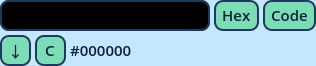
| Control | What it does |
| The color button | Opens the color picker. |
| The mode button | How the numbers are written. Click to cycle: Hex, 0-1, 0-255. |
| The format button | What surrounds them. Click to cycle: Code, Color(). |
| ↓ | Types the color text at the caret of the field being edited. |
| C | Copies the color text to the clipboard. |
| The color text | The color as it will be typed. It can be selected and copied. |
| Mode | Code | Color() |
| Hex | #ff8800 | Color("#ff8800") |
| 0-1 | 1, 0.533, 0 | Color(1, 0.533, 0) |
| 0-255 | 255, 136, 0 | Color8(255, 136, 0) |
#ff880080.
- Use Hex and Code for BBCode tags and most color fields.
- Use Color() in expressions and wherever GDScript is expected.
| Option | Description |
| Reference | Inserts panels with this reference read their color tags' color from this panel. No two Color Selectors can have the same. |
| Single row | Places everything on one row, for a wide and short Area. |
| Scroll when the contents don't fit | When off, the panel can't shrink below its contents. |
| Minimum Size, Maximum Size | The minimum and maximum size of the panel's Area. |