

Dialogue Editor
The Dialogue Editor edits one Line: the one clicked last in the Dialogue Navigator. Until a Line is selected, it displays "Select a line in the Dialogue Navigator."
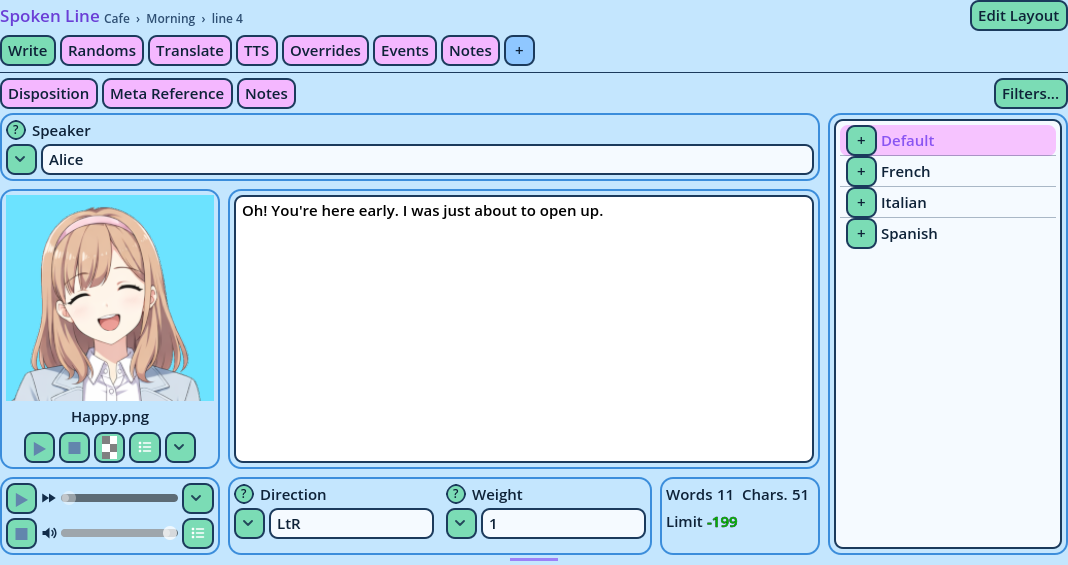
Its content depends on the Line's Command. Each Command has its own line layout: one or more tabs, each divided into areas that contain widgets. Most Commands only need a list of fields. A Spoken Line has many more widgets: a text editor, a portrait preview, a voice player, counters.
This page describes the panel itself. For the editing itself, see Editing Lines. For each widget, see Widgets.
| Item | What it does |
| Options | The widget's settings. |
| Fields... | For a Fields widget: which fields it displays, in what order, and over how many columns. |
| Scroll | Whether the widget scrolls inside its area. Off, the area grows to fit, and the whole tab scrolls. |
- Editors with the same reference display the same Line. Placed in different windows, or on different tabs of the Line, they display more of it at once.
- An Editor with another reference displays the Line selected in the Navigators with that reference, so two Lines can be edited side by side.